

Step‑by‑step guide to connect Mailgun with Nova Express in 20 minutes. Learn pricing, domain verification, API setup, and save thousands per year.
Sending emails shouldn’t cost a fortune. But traditional platforms charge you for storing contacts, even if you never email them.
Tired of paying $300+ monthly for a platform that charges you for inactive contacts? There’s a smarter way. Nova Express handles your campaigns with 270+ templates, AI copywriting, free stock photos, multilingual support, subaccounts for teams, and detailed analytics, while Mailgun delivers your emails at wholesale prices. No bloated bundles. No hidden fees. Just what you actually need.
Why Choose Mailgun for Nova Express Email Marketing?
Mailgun is the sweet spot for most teams: incredibly reliable, simple to connect, and it costs just $35/month for 50,000 emails. Together with Nova Express at $20/month, you get a complete email marketing stack for only $55, instead of the typical $300–$450+ charged by traditional platforms.
Compare Costs: How Nova Express + Mailgun Saves You Money
Traditional platforms bundle delivery, contacts, and features into one price and often charge per contact, even for inactive ones. With Nova Express + Mailgun, you decouple the stack: pay only for delivery (Mailgun), while Nova Express provides unlimited sends, contact storage, and professional tools for a flat fee.
Most email tools follow one of two pricing models: contacts‑based or send‑based. With Nova Express + Mailgun, you effectively switch to a send‑based model, so you pay for email volume, not for how many contacts you store.
Ready to cut your email bill by 80%? Here’s the step-by-step guide to connecting Mailgun to Nova Express.
Mailgun Pricing & Cost Calculator for 50,000+ Emails
| Plan | Monthly Cost | Best For |
|---|---|---|
| Basic | $15 | Small businesses |
| Foundation | $35 | Most businesses |
| Scale | $90 | High-volume |
Example: 50,000 emails = $35/month
Full pricing table and calculator below →
Example:
If you’re on Foundation and send 60,000 emails in a month:
- Included: 50,000 emails ($35)
- Overage: 10,000 emails × $1.30 = $13
- Total: $48/month
💡Pro Tip: If you consistently exceed your monthly limit, it’s cheaper to upgrade to the next tier. The Scale plan offers much better overage pricing for higher email volumes.
Nova Express Plans and Unlimited Sending
Nova Express offers unlimited email sends on all plans; you only pay for Mailgun/AWS delivery.
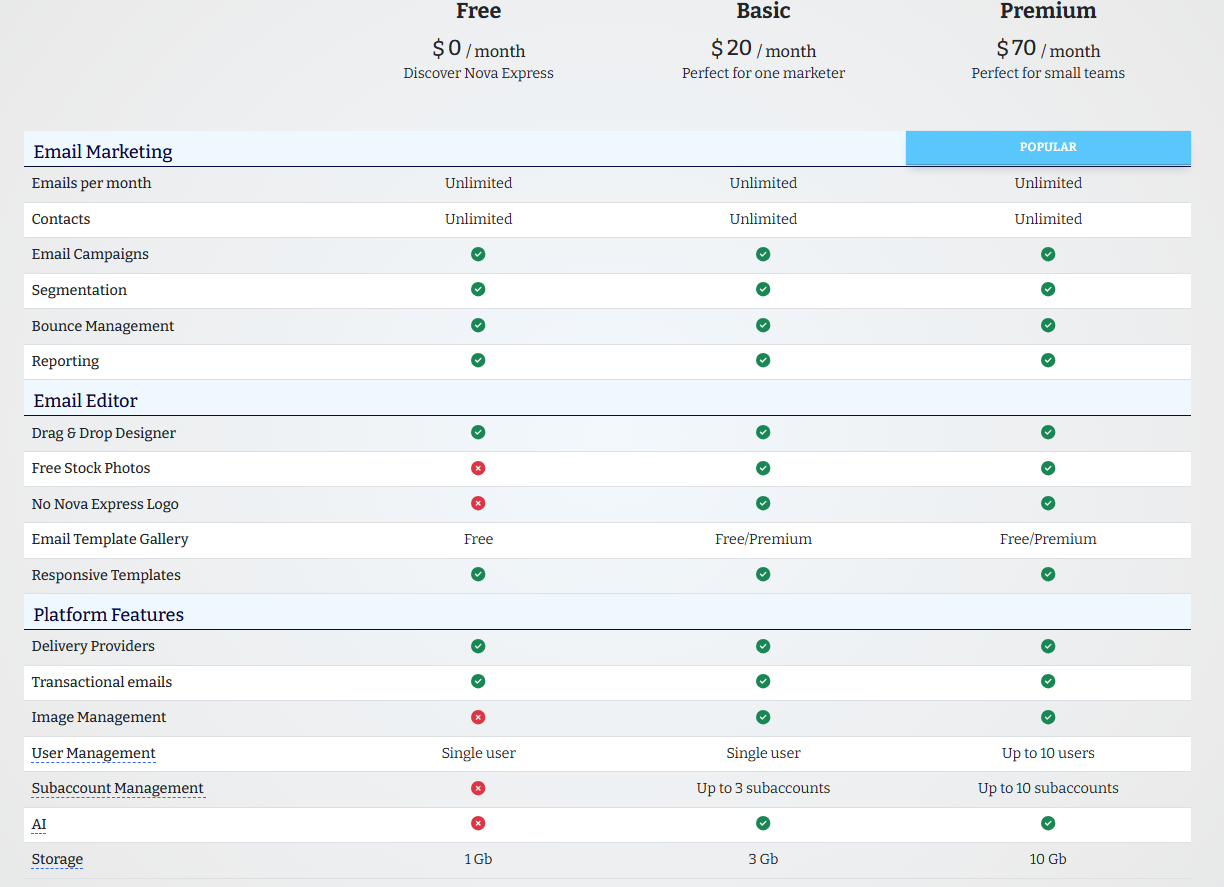
Total Monthly Cost (50,000 emails)
| Configuration | Mailgun | Nova Express | Total Budget |
|---|---|---|---|
| Recommended | $35 | Basic $20 | $55/month |
| Teams (Scale) | $90 | Premium $70 | $160/month |
If you’ve tallied your mailing costs and realized you’re overpaying for bundled “all‑in‑one” packages instead of actual sending, this guide is for you. You keep your familiar workflow, but gain control over deliverability, infrastructure, and what you pay for.
It’s designed for those who want reliable delivery and predictable costs but aren’t ready to dive into technical nuances or spend weeks figuring out the infrastructure.
Nova Express with Mailgun works particularly well for marketers who are leaving expensive all-in-one platforms and want to maintain their familiar workflow without overpaying for a “default package.” If you’re already familiar with Mailgun and have used it in other projects, connecting it takes just a few minutes.
If, however, you are just starting out with email marketing and want to first understand how it works, the mechanics of sending it, the types of emails, and the right first steps, it is better to begin with our practical guide for beginners. It covers the core questions, and you can return to cost optimization later once the process is clear.
Step-by-Step Guide: Connecting Mailgun to Nova Express
Prerequisites
Before you begin, make sure you have:
– ✅ Access to your domain’s DNS settings
– ✅ Credit card (Mailgun free plan limited to 100 emails/day)
– ✅ Nova Express account (create a free account)
– ⏱️ Estimated time: 20 minutes
– 🔧 Technical difficulty: Beginner-friendly
Ready to get started right now? Create a Nova Express account and follow along.
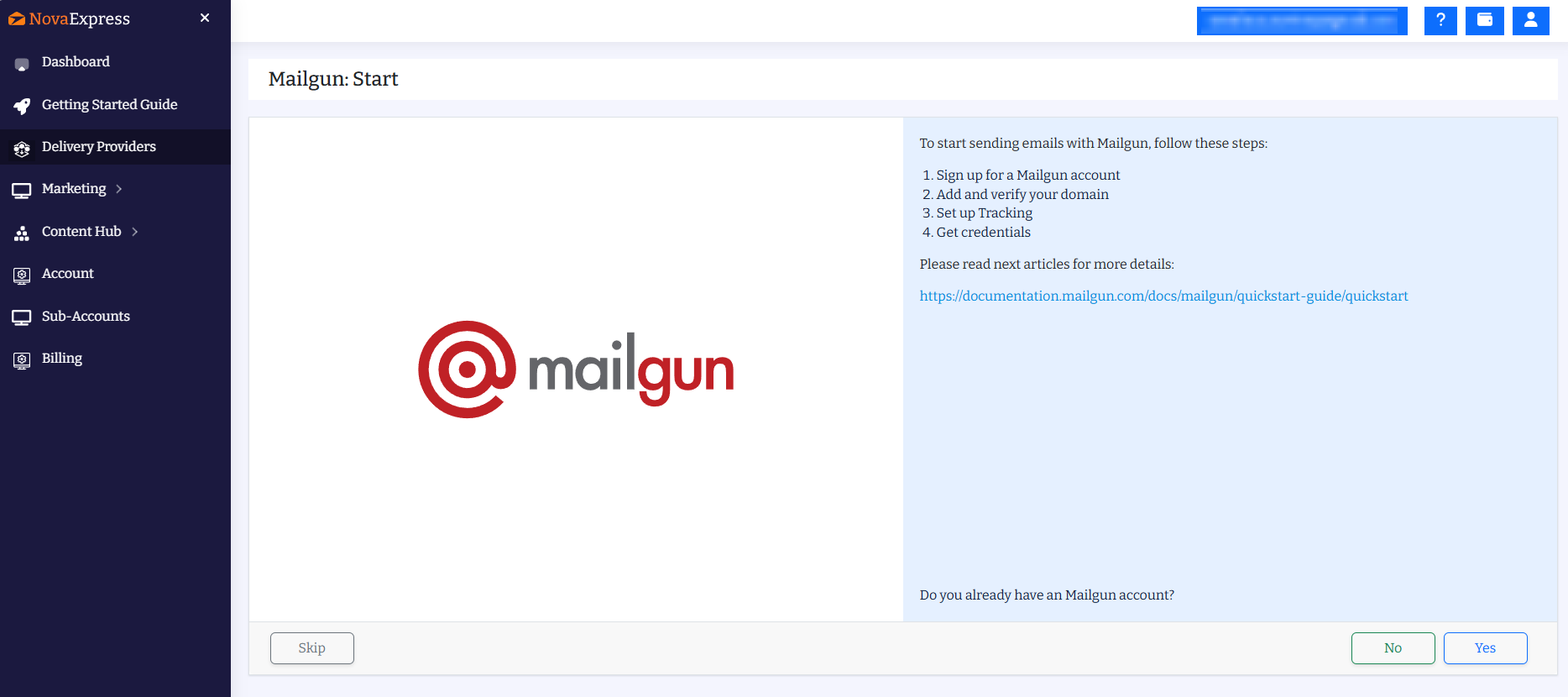
To start sending emails with Mailgun, follow these steps:
- Sign up for a Mailgun account
- Add and verify your domain
- Set up Tracking
- Get credentials
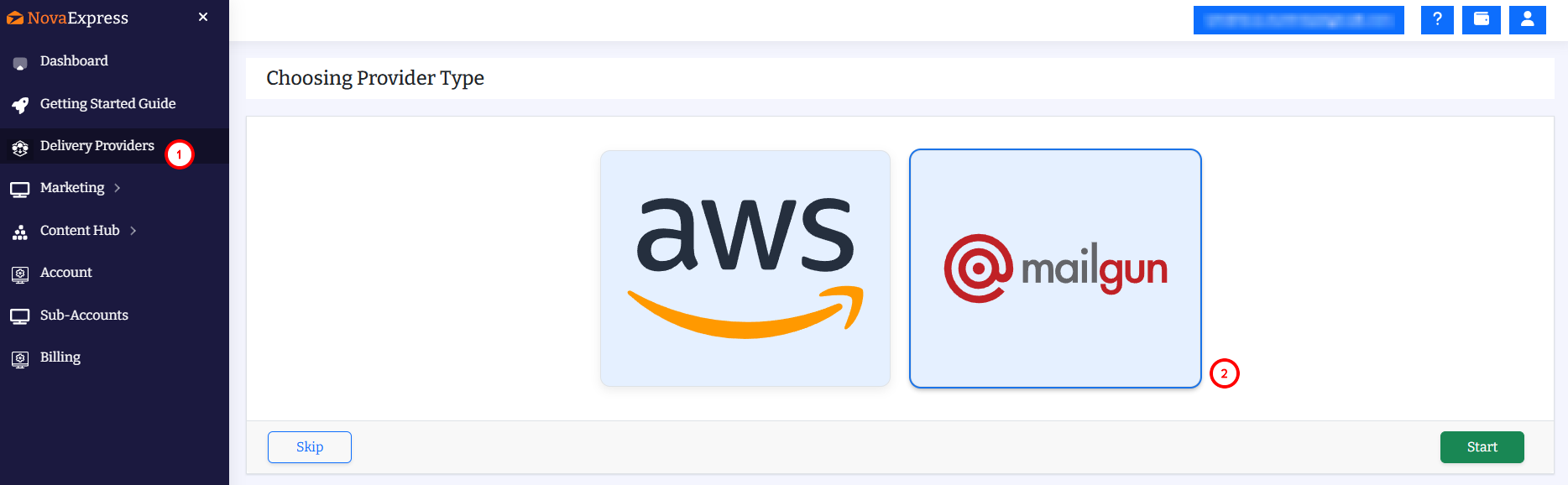
Step 1: Choose Mailgun as Your Email Delivery Provider
First, choose Mailgun and click start.
Step 2: Launch the Guided Mailgun Setup
If you already have a Mailgun account, click Yes. Otherwise, click No to create one.
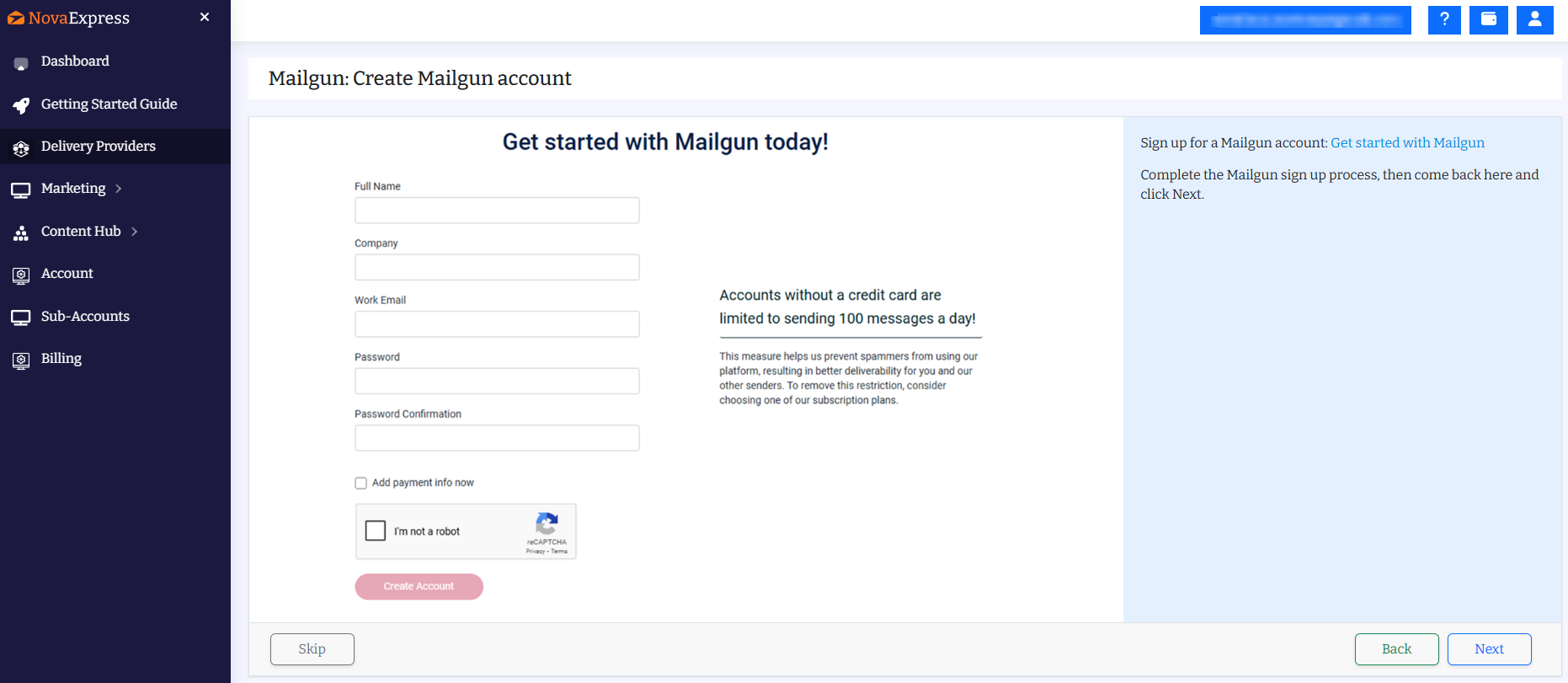
Step 3: Create Your Mailgun Account and Complete Signup
Fill in the signup form with your details:
- Full Name
- Company
- Work Email
- Password
Important: Free accounts (without a credit card) are limited to 100 messages per day. This is perfect for testing, but you’ll need to add payment info to send at scale.
Complete the reCAPTCHA and click Create Account.
Step 4: Add and Verify Your Domain in Mailgun
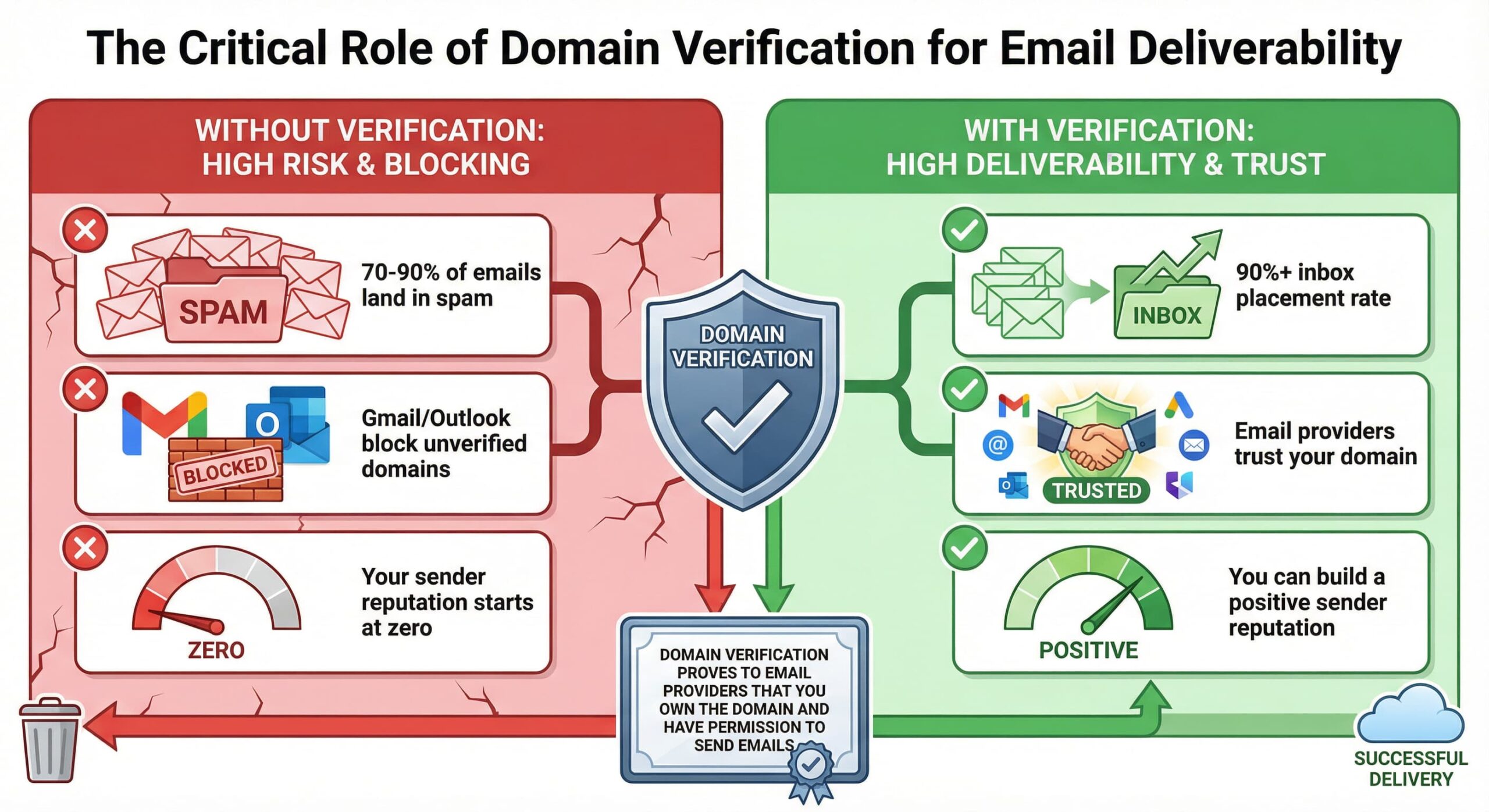
Domain verification is essential for email deliverability. Without it, your emails will likely land in spam.
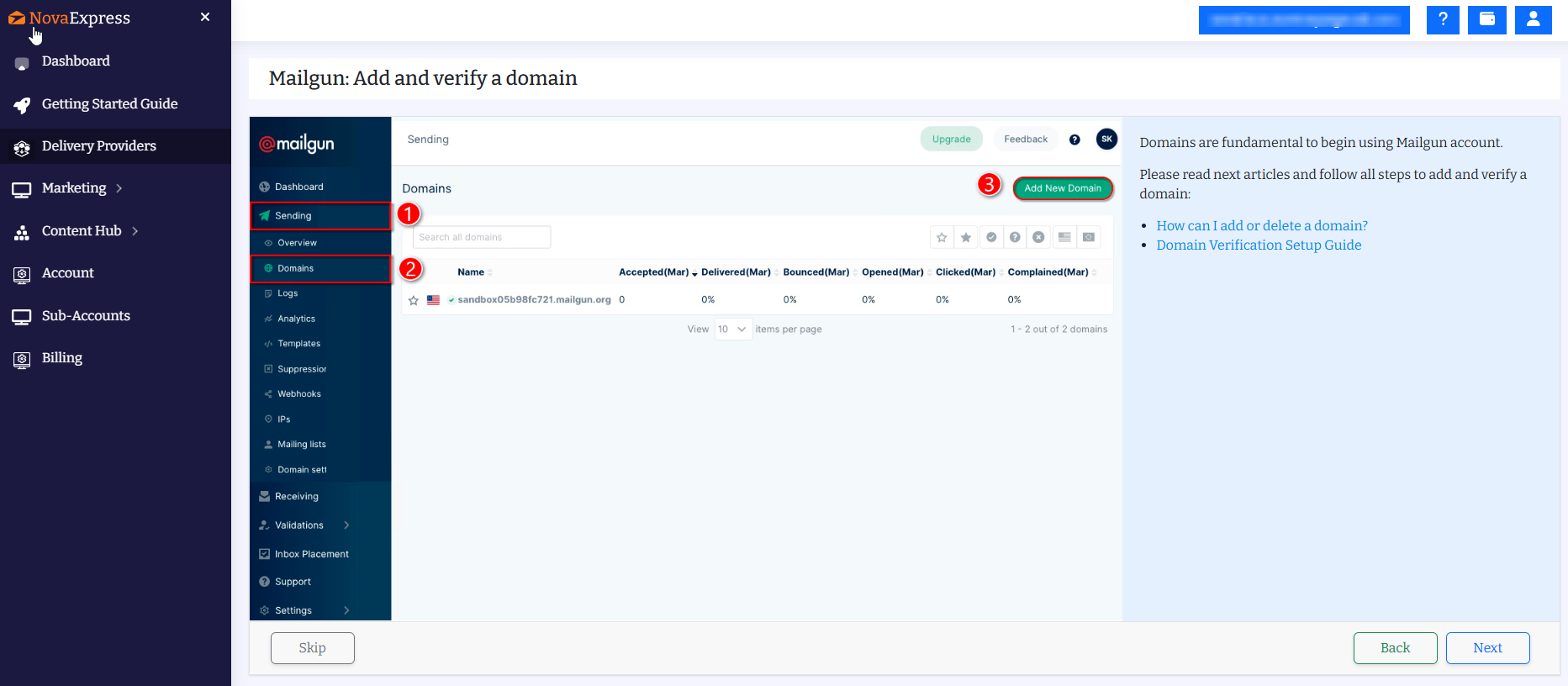
In the Mailgun dashboard:
- Go to Sending in the left menu.
- Click Domains.
- Click Add New Domain.
You’ll see a sandbox domain (like sandbox05b98fc721.mailgun.org) by default. This is for testing only. Add your own domain for production use.
⚠️ Important: Don’t forget to click ‘Verify DNS settings’ inside Mailgun after adding the records to your hosting, otherwise the verification won’t finish.
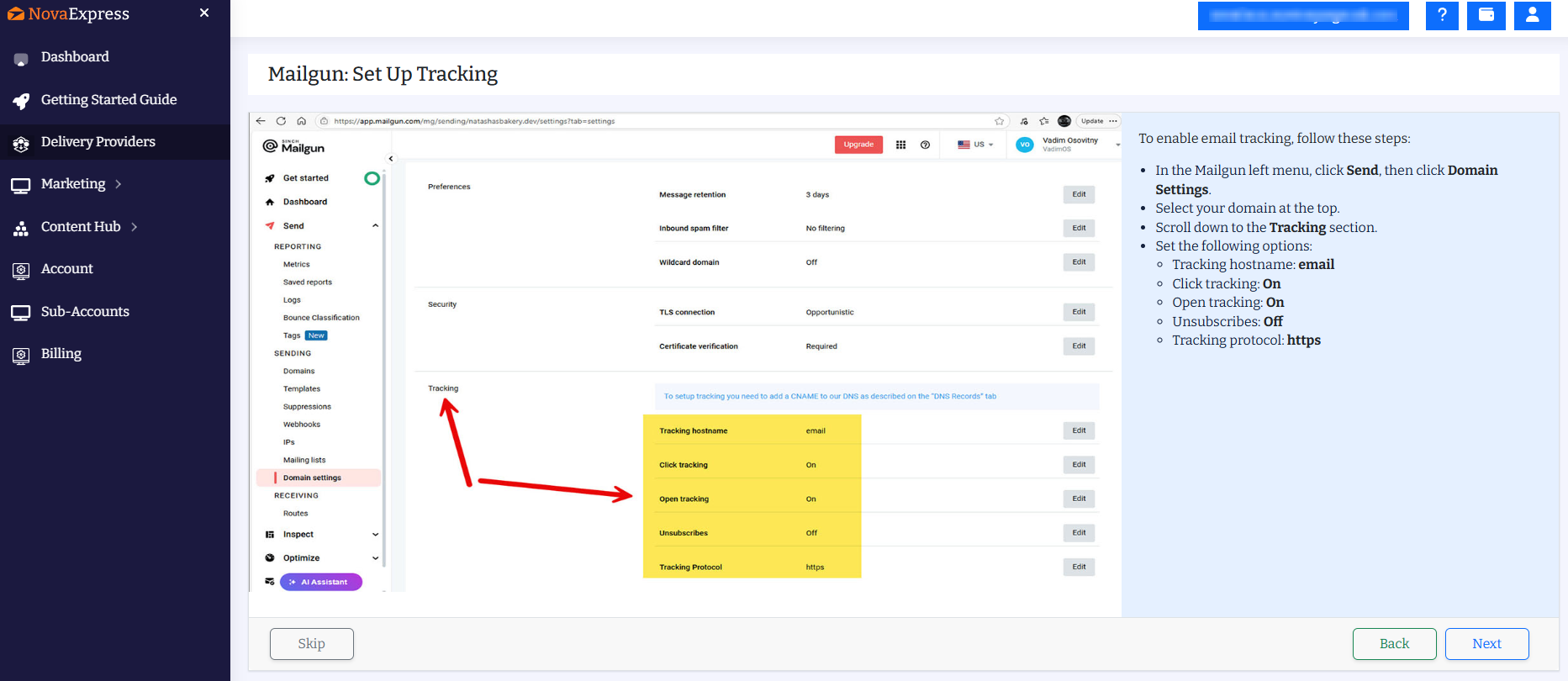
Step 5.1: Set Up Email Tracking in Mailgun
To enable email tracking, follow these steps:
- In the Mailgun left menu, click Send, then click Domain Settings.
- Select your domain at the top.
- Scroll down to the Tracking section.
- Set the following options:
- Tracking hostname: email (Mailgun will create tracking URLs like
email.yourdomain.com) - Click tracking: On
- Open tracking: On
- Unsubscribes: Off
- Tracking protocol: https
- Tracking hostname: email (Mailgun will create tracking URLs like
- Save the settings and copy the CNAME record that appears. It will look like:
email.yourdomain.com → mailgun.org
Step 5.2: DNS Setup for Email Tracking (Required After Step 5.1)
⚠️ CRITICAL: Without this DNS record, tracking links will not work and opens/clicks will not be recorded.
Add this DNS record in your DNS provider:
| DNS Type | Name/Host | Value/Target | Important Notes |
|---|---|---|---|
| CNAME | email (must match your Mailgun tracking hostname) | mailgun.org | Cloudflare: Set to DNS only (gray cloud, NOT orange proxy) for basic tracking. For HTTPS tracking, orange cloud + SSL setup is required. |
How to add:
Cloudflare:
DNS → Add Record → Type: CNAME → Name: email → Target: mailgun.org → Proxy status: DNS only (gray cloud).
Namecheap / GoDaddy:
Advanced DNS → Add CNAME → Host: email → Value: mailgun.org → TTL: Automatic (600 seconds).
Wait 15–30 minutes for DNS propagation.
Verify the CNAME record:
nslookup email.yourdomain.com
Should return: canonical name = mailgun.org
Final check: Return to Mailgun → Domain Settings → Tracking and confirm the status shows ✅ Active.
If you skip this step: Tracking links may return 404 errors and opened/clicked events will not be recorded.
Step 6: Generate and Copy Your Mailgun API Key
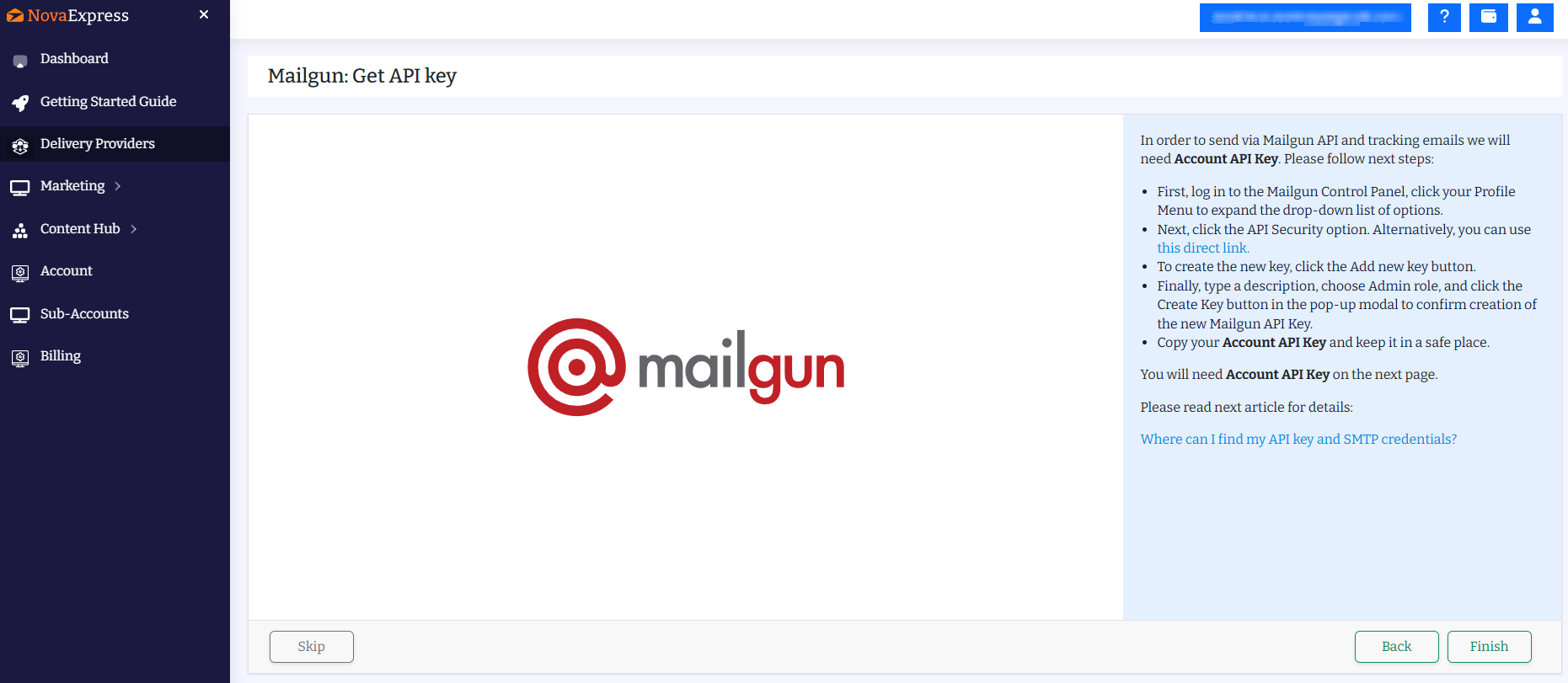
To enable sending via the Mailgun API and tracking emails, you will need your Account API Key. Please follow these steps:
- First, log in to the Mailgun Control Panel, click your Profile Menu to expand the drop-down list of options.
- Next, click the API Security option. Alternatively, you can use this direct link.
- To create the new key, click the Add new key button.
- Finally, type a description, choose Admin role, and click the Create Key button in the pop-up modal to confirm creation of the new Mailgun API Key.
- Copy your Account API Key and keep it in a safe place.
You will need Account API Key on the next page. Please read next article for details:
Where can I find my API key and SMTP credentials?
Step 7: Connect Mailgun to Nova Express Using API Key
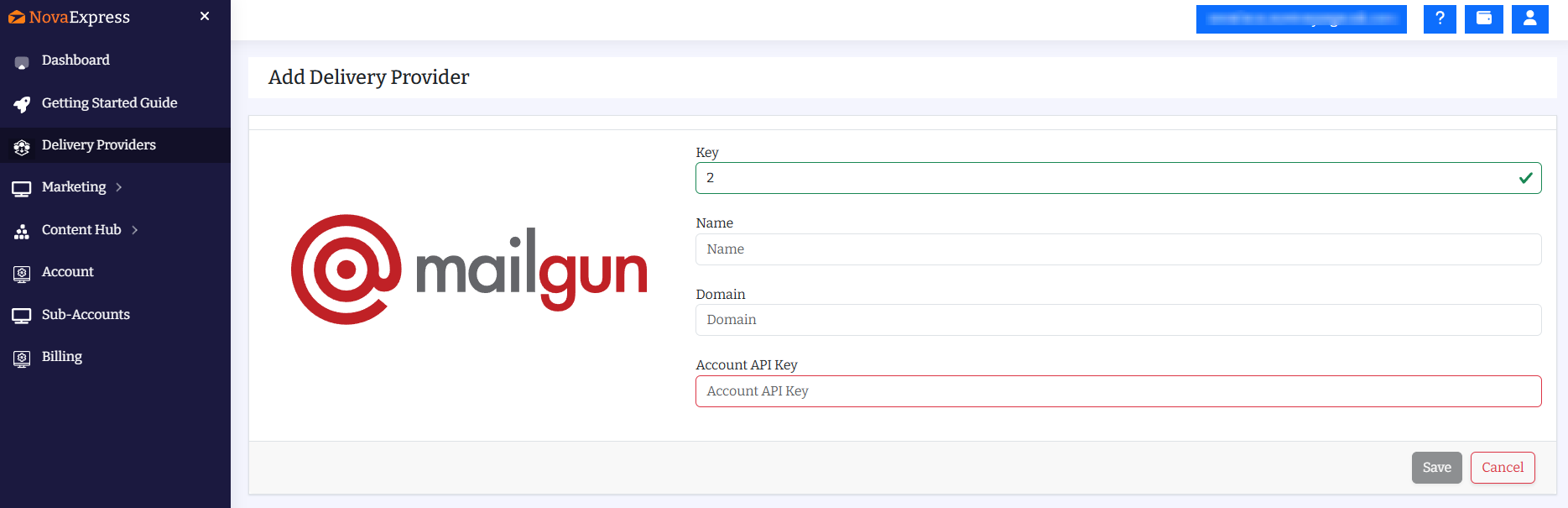
Almost done! In Nova Express, go to Delivery Providers and fill in the following fields:
Name: Give your provider a clear name, like “Mailgun: yourdomain.com”
Domain: Enter the verified domain you set up in Step 4
Account API Key: Paste the key you copied in Step 6
Click Save, and you’re all set. Your emails will now be sent through Mailgun!
What’s Next After You’re Connected?
Now that Mailgun is connected, here’s how to maximize your email marketing:
- Warm up your domain: Don’t blast 50,000 emails on day one. Follow our Email Warm-Up Guide: 4 Weeks to 90% Inbox Placement to build sender reputation safely.
- Pick your first template: Choose from 270+ Free Email Templates tested for conversions across 40+ email clients.
- Set up your welcome series: First impressions matter. Use our Free Welcome Email Templates to engage subscribers from day one.
- Go multilingual: Targeting international audiences? Learn how to Create Multilingual Email Campaigns in 10 Minutes with Nova Express.
- Need a complete roadmap? Check out our How to Start Your First Email Campaign guide for a full step-by-step walkthrough.
Mailgun vs Amazon SES: Which Is Better? (Comparison for 50,000 emails/month)
| Feature | Mailgun | Amazon SES |
|---|---|---|
| Monthly cost (50K emails) | $35 | $5 |
| Dashboard UI | Clean, intuitive | Complex AWS Console |
| Documentation | Excellent | Technical |
| Support | Email + Chat | AWS support plans only |
Bottom line: Mailgun is easy to set up and lets you start sending emails right away. Amazon SES can help reduce costs, and our step-by-step guide makes setup smooth and hassle-free.
Frequently Asked Questions
Is Mailgun worth the cost?
If you value simplicity and a fast start, absolutely. You’re still saving $2,300–$3,500/year compared to traditional platforms, while enjoying a clean UI, excellent documentation, and reliable support.
Can I switch from Mailgun to SES later?
Absolutely. Nova Express supports both providers. You can start with Mailgun for simplicity, then switch to SES when you’re ready to optimize costs. Your contacts, templates, and campaigns stay the same.
How do I avoid landing in spam?
Three things:
- Verify your domain with SPF (Sender Policy Framework), DKIM (email security protocol), and DMARC (anti-spoofing protection).
- Warm up your sending gradually.
- Keep your list clean. Our Email Warm-Up Guide covers this in detail.
How long does domain verification take?
Usually 20–30 minutes after you add DNS records, but sometimes up to 24 hours. Check Mailgun’s Domains tab to confirm verification status.
Final Thoughts: Save Money and Improve Email Deliverability
Connecting Mailgun through Nova Express takes about 20 minutes. At $55/month for 50,000 emails, it’s dramatically more affordable than traditional email marketing platforms, and the process is straightforward.
Mailgun is perfect for teams who value clean UI, excellent documentation, and reliable deliverability. Combined with Nova Express, you have everything you need to run professional email campaigns without overpaying.
Start simple. Send a few test campaigns. Track your results. You’re up and running and saving thousands per year. That’s what matters.
Nova Express Resources
- Why AI Cites Some Brands and Ignores Others: The Citation Stack Explained
- What Is Nova Express?
- Email Marketing Pricing Models: Contacts-Based vs. Send-Based
- Subaccounts Made for Marketers Who Manage Multiple Clients
- How to Start Your First Email Campaign: Step-by-Step Guide
- Email Marketing Efficiency: Scale Smart
- NotebookLM for Marketers
- AI Tools for Marketers
- Dan Kennedy’s Email Marketing Principles
- Nano Banana Pro: The Complete Guide for Marketers 2026
- 2026 Holiday Marketing Calendar
Start now: Nova Express
This article was originally published in 2025 and updated in 2026 to include the latest strategies and data.
About the author
Serafima Osovitny is a Marketing Manager at Nova Express, where she focuses on digital marketing, search visibility, content strategy, and marketing workflows. She writes practical guides that help marketing teams research their audiences, develop strategies, and put their plans into action.
Explore her work at serafima.digital and follow her on X: @OSerafimaA.








A super useful article. Finally, everything about Mailgun in one place! Clear steps, real pricing, and practical advice on domains and tracking. You can put it to use right away.
Great guide! Finally, all the information about Mailgun is gathered in one place. The DNS setup steps and the honest pricing breakdown were especially helpful.
Really helpful article. Everything is explained clearly, and I finally understood how to set up Mailgun without getting lost in the technical steps.
I’d been looking for a proper Mailgun setup guide for a long time and finally found it! The instructions on Nova Express are super clear, even for someone who’s not very “technical.” The setup took literally around 20 minutes, and everything worked perfectly on the first try.