

Let me tell you a secret I’ve seen at dozens of companies: you’re overpaying for email by 14x and don’t even know it.
Many capable companies pay $300 to $350 each month for the privilege of sending email. It is considered normal. Budgets are approved, and invoices are paid.
But what if I told you there is a more intelligent way? A method that does not require you to compromise on quality yet saves you thousands of dollars a year.
Real Numbers: Sending 50,000 Emails Per Month
Traditional Email Platforms: $300–$350/month ($3,600–$4,200/year) AWS + Nova Express: $25/month ($300/year). Estimated annual savings for 50,000 emails/month: ~$3,300. Actual savings depend on your sending volume. This is not marketing. This is pure arithmetic.
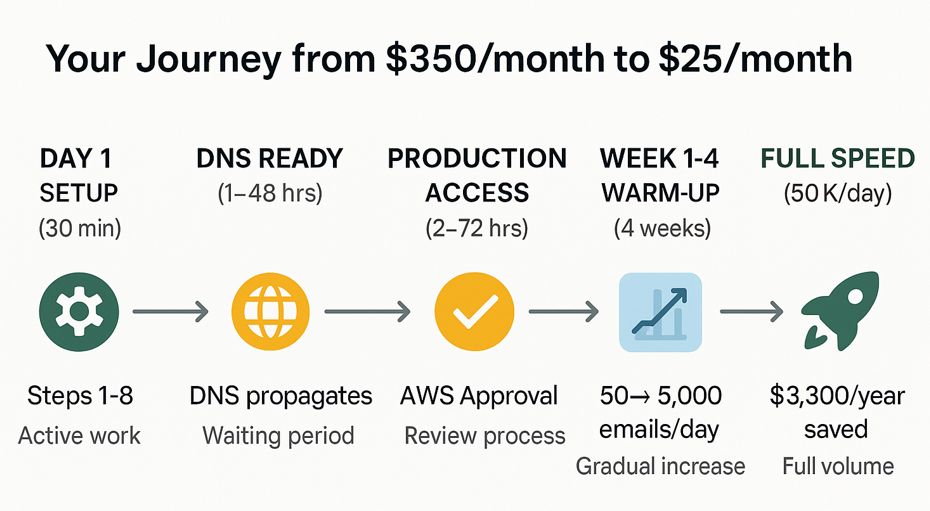
And the greatest part? You can implement these savings directly within Nova Express in just 30 minutes. No complexity, no fear of the AWS console. Let me show you how.
Why AWS Saves You Money Compared to Traditional Email Platforms
Traditional email platforms charge for storage. AWS charges for usage.
You don’t pay for contacts you don’t email. You don’t pay for a month when you send nothing. You pay for what you actually use.
It’s the difference between renting an apartment (a fixed monthly cost) and paying for utilities (only for what you use).
Here’s what you actually get:
✅ Total cost (example):
• Nova Express: $20/month (flat fee)
• Amazon SES: $5/month when sending 50,000 emails, but SES has no fixed fee: you pay $0.10 per 1,000 emails sent.
→ So, if you send 0 emails, you pay $0. If you send 200,000, you pay ~$20.
✅ Scalability: SES scales automatically (up to 15M emails/day for most accounts), but cost scales linearly with volume, not fixed.
✅ 99.9% infrastructure uptime. Inbox placement (70-95%) depends on domain reputation, list hygiene, and Gmail/Yahoo compliance.
✅ You control your reputation, but AWS monitors bounce/spam rates. Keep bounces <5% and complaints <0.1% to avoid suspension
Want to understand how different pricing models work? → Read our full comparison of contact-based vs. send-based pricing.
Calculate Your Exact Savings with Amazon SES
Stop guessing. Use our calculator to see your exact savings.
Just answer two questions:
- How many contacts do you have?
- How many emails do you send per month?
Then see your number. That’s how much you save. Every single month.
For a deep dive into pricing models and how they affect your ROI, check out our detailed Email Marketing Efficiency guide.
Who This Guide Is For
This is not a DevOps tutorial. This is not a deep technical dive.
This is for:
- Marketers are tired of paying $300+/month for email
- Agencies juggling multiple clients and budgets
- Founders who want to control their infrastructure costs
- Anyone who wants to save $3,000/year and keep it simple
If you’re looking for a technical deep dive into AWS security groups, this isn’t it.
If you want a practical setup in 30 minutes and then forget about pricing, read on.
Pre-Setup Checklist (30 seconds to read)
✅ Access to your domain’s DNS settings (Cloudflare/Route53/Namecheap)
✅ Professional email inbox for AWS verification codes
✅ Password manager ready (1Password/Bitwarden)
✅ Credit card for AWS account ($1 temporary hold)
If you have these 4 things, you’re ready. No other prep needed.
Common Fears About Amazon SES and How to Overcome Them
AWS looks scary. Dark screens, buttons everywhere, dense documentation.
Reality? 8 clicks in Nova Express, and you’re done.
Here’s what people typically worry about:
- “AWS is too complicated.”
- “I’ll mess up my domain.”
- “My emails won’t deliver.”
All valid concerns. All easily solved with the right guidance.
That’s why we built Nova Express to handle the complexity for you. You won’t have to go into the AWS console alone. Instead, you click a button, the platform guides you through each step, and shows you screenshots of exactly what you need to do.
Ready to save $3,000+ per year right now?
👉 Start your setup while reading: Create a Nova Express account.
You can have this completely set up by the time you finish this article.
Amazon SES Setup Step-by-Step (Setup time: 30 minutes)
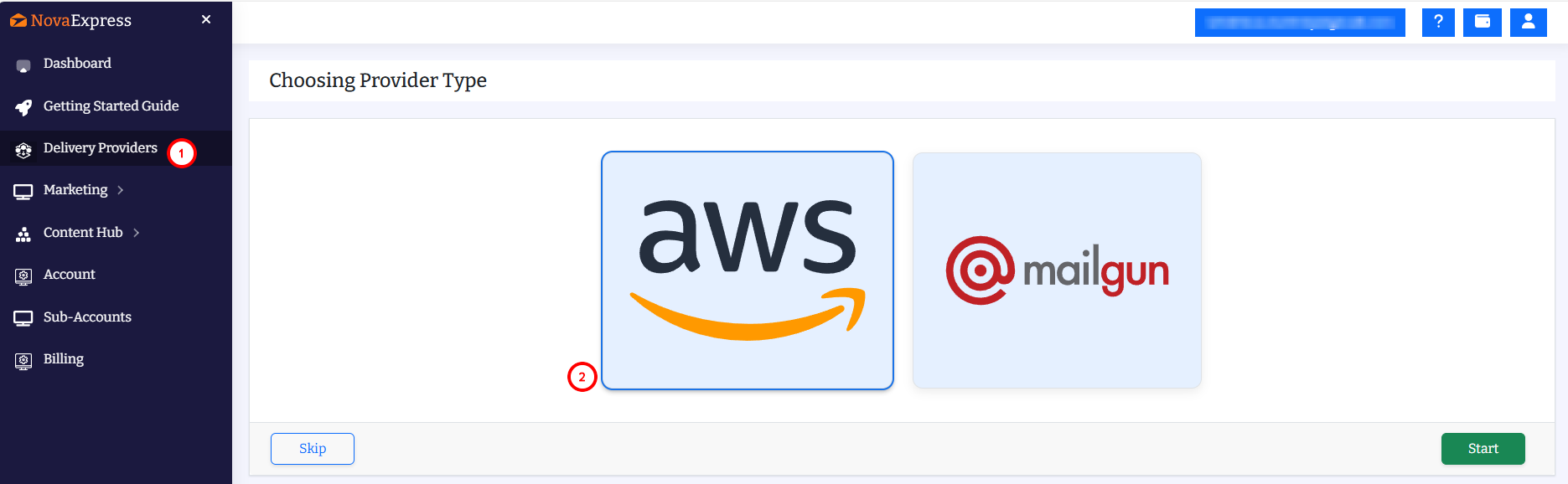
Step 1: Choose Amazon SES as Your Email Delivery Provider
First, you choose AWS and click start.
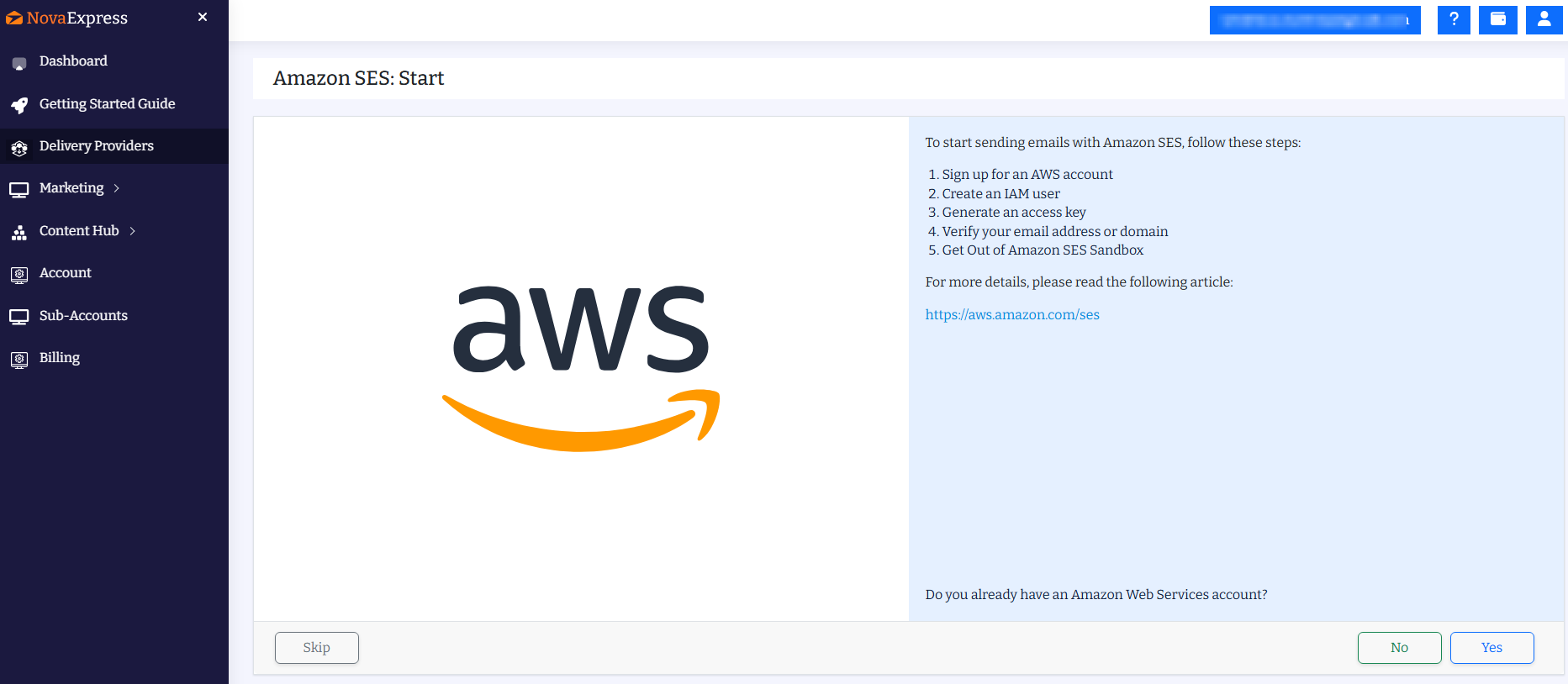
Step 2: Launch the Guided Amazon SES Setup
If you already have an Amazon SES account, click Yes. Otherwise, click No to create one.
Step 3: Create Your AWS Account for Amazon SES
Time: 5 minutes
- Go to aws.amazon.com and click “Create an AWS Account“
- Enter your root email
- Choose “Personal Account” (unless you need business billing)
- Provide: name, phone number, address, credit card ($1 temporary hold)
CRITICAL: This email receives domain verification codes later. Use an inbox you control.

Step 4: Create an Amazon SES User
We’re going to add a user to your AWS account. First, navigate to the AWS IAM (Identity and Access Management) service. Please follow these steps:
- Go to the Add user screen in the AWS IAM console.
- Enter novaexuser as the user name.
- Click the Next button at the bottom.
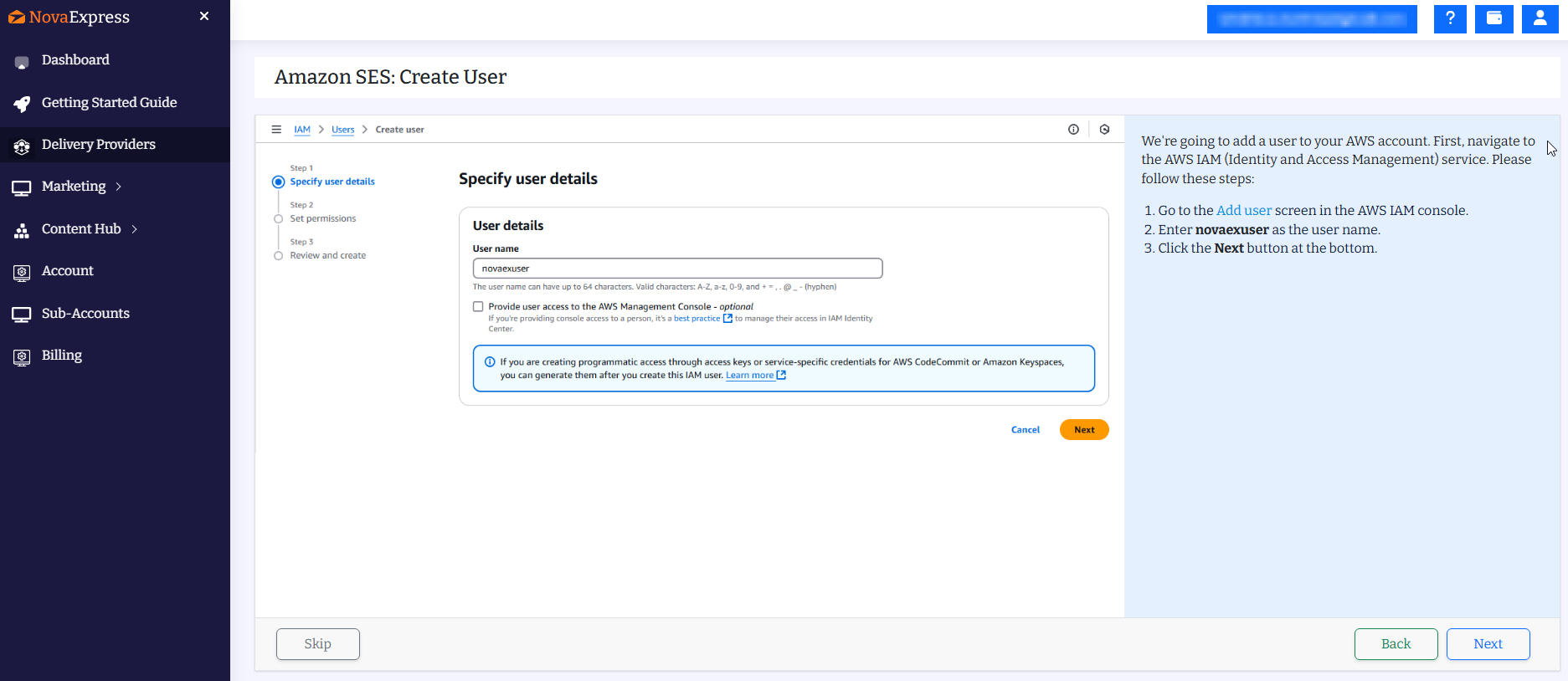
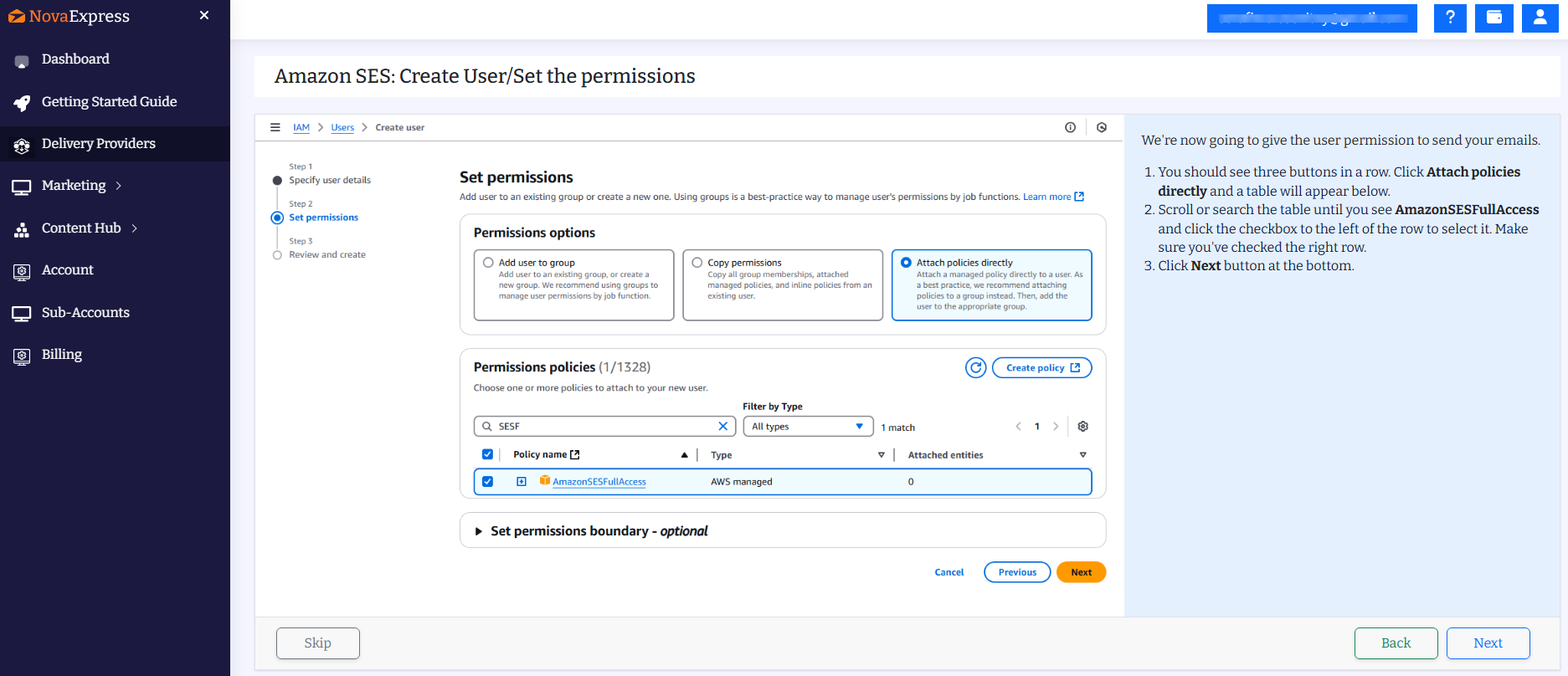
Amazon SES: Create User/Set the Permissions
We’re now going to give the user permission to send your emails.
- You should see three buttons in a row. Click Attach policies directly and a table will appear below.
- Scroll or search the table until you see AmazonSESFullAccess and click the checkbox to the left of the row to select it. Make sure you’ve checked the right row.
- Click Next button at the bottom.
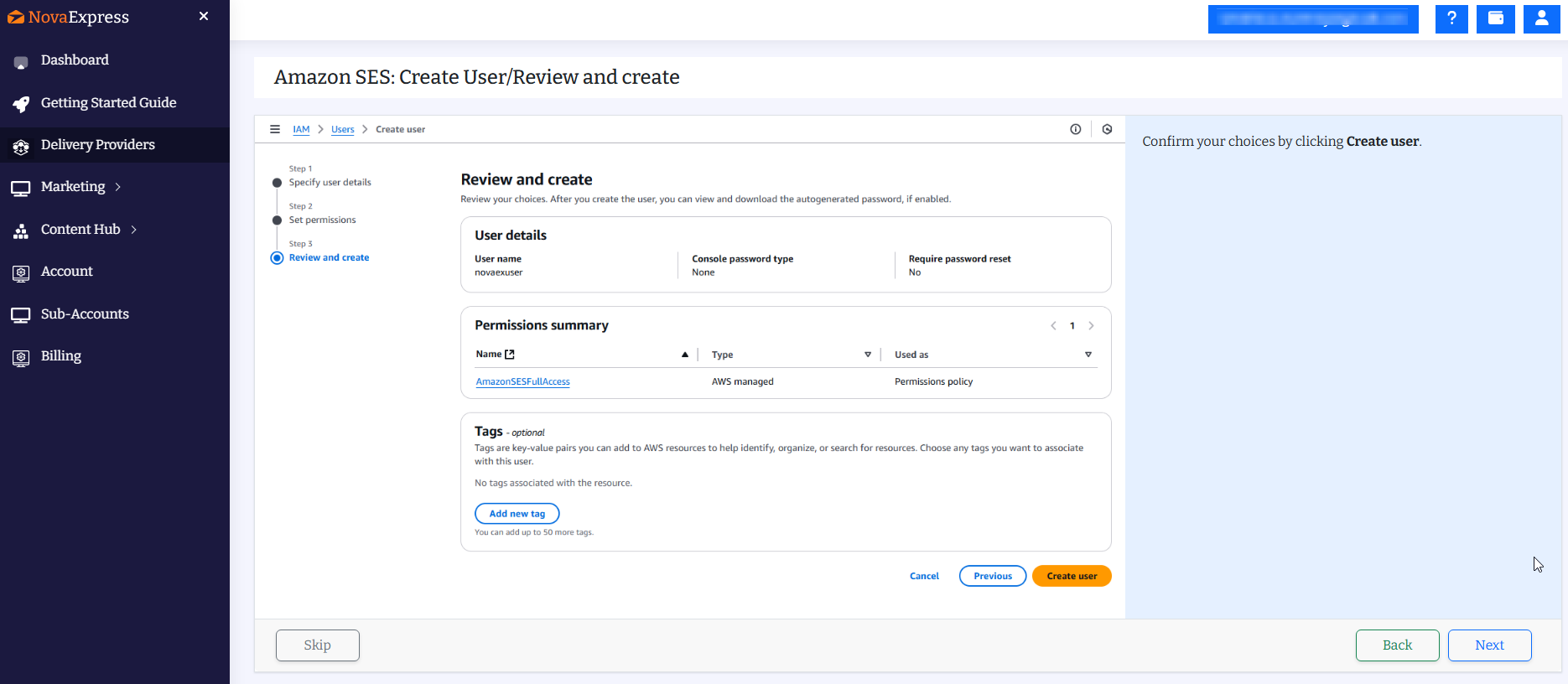
Amazon SES: Create User/Review and create
Confirm your choices by clicking Create user.
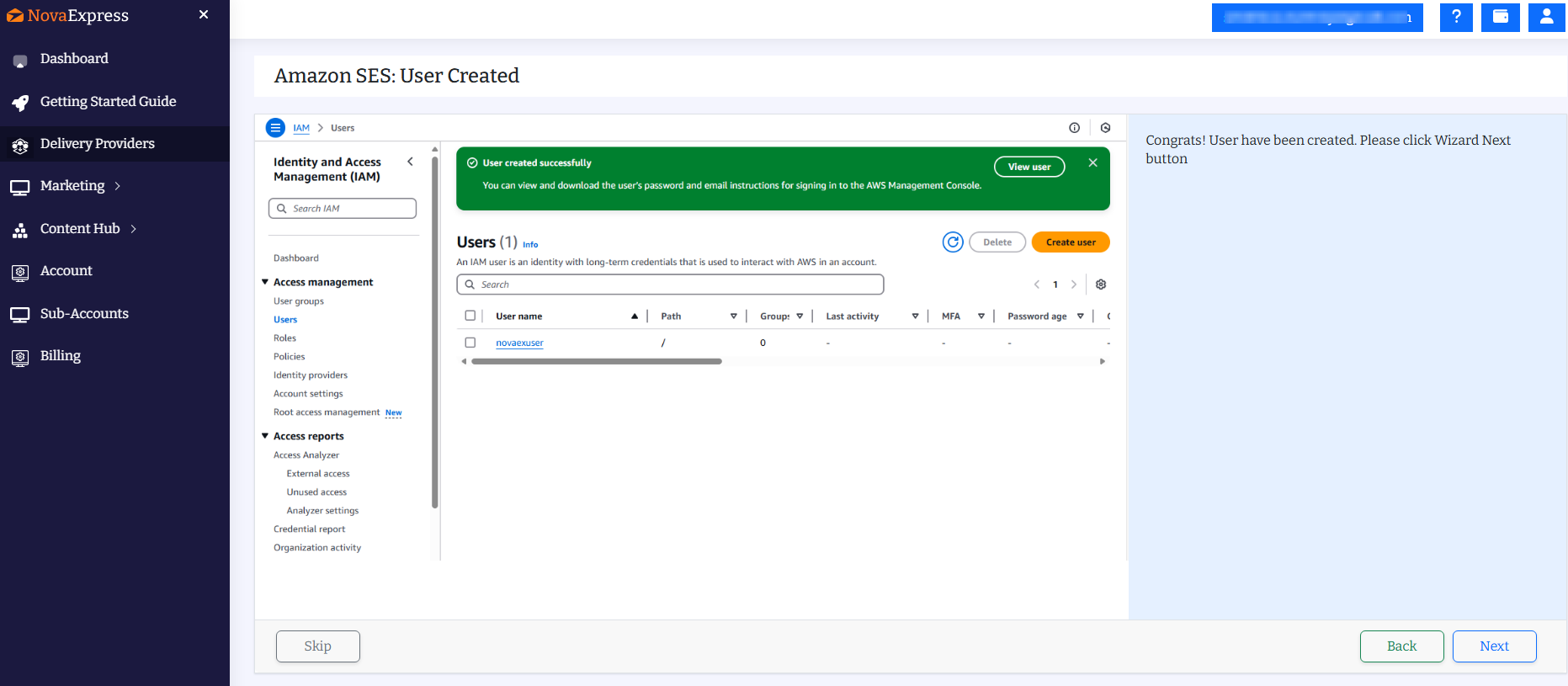
Amazon SES: User Created
Congrats! User have been created.
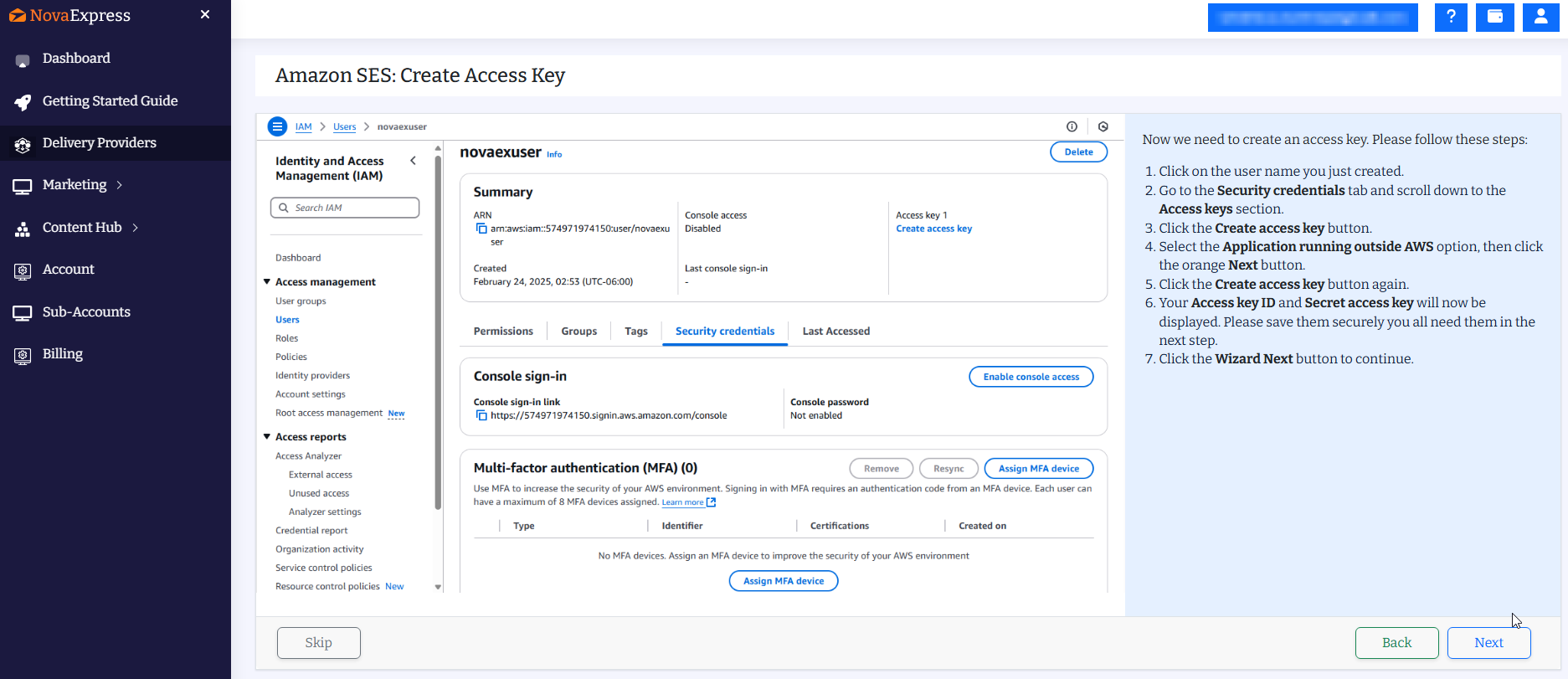
Step 5: Create Amazon SES Access Key
Now we need to create an access key. Please follow these steps:
- Click on the user name you just created.
- Go to the Security credentials tab and scroll down to the Access keys section.
- Click the Create access key button.
- Select the Application running outside AWS option, then click the orange Next button.
- Click the Create access key button again.
- Your Access key ID and Secret access key will now be displayed. Please save them securely you all need them in the next step.
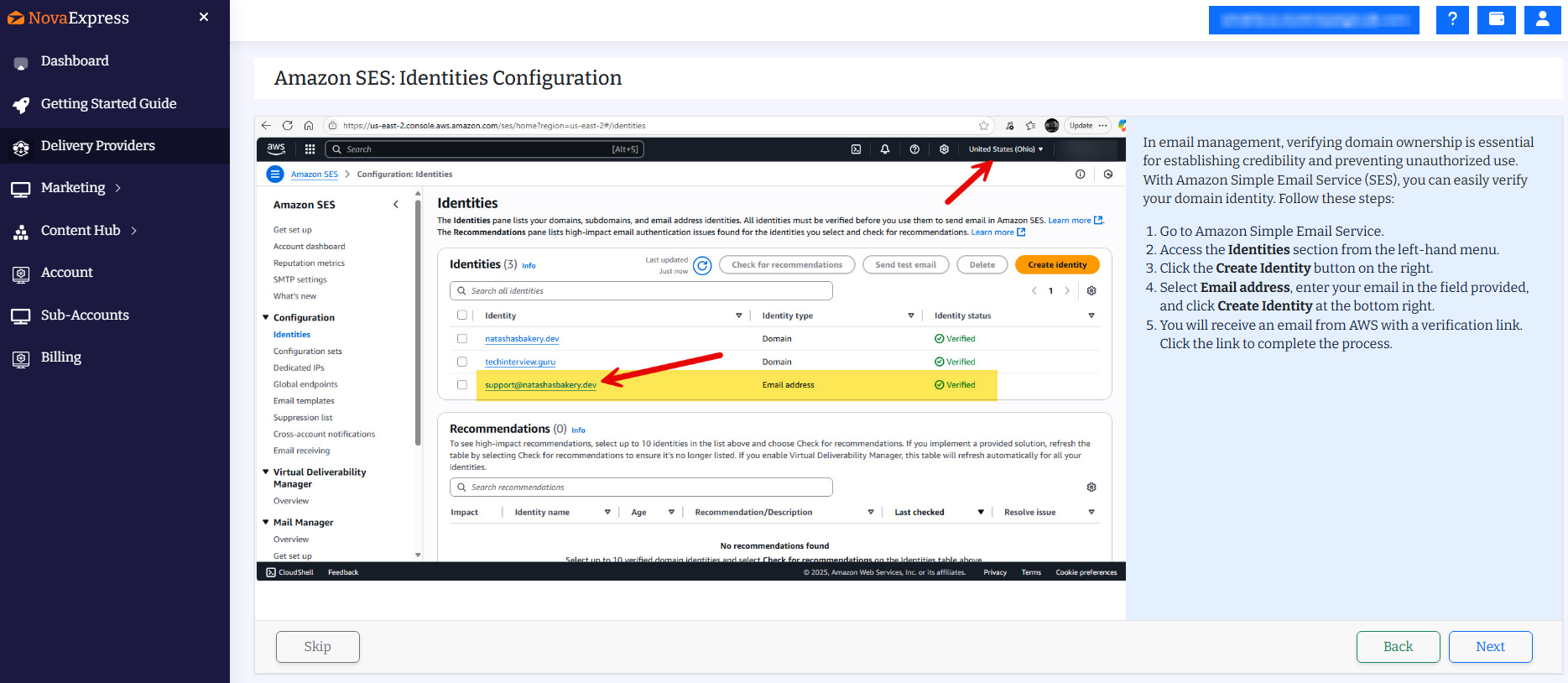
Step 6: Configure Amazon SES Identities
In email management, verifying domain ownership is essential for establishing credibility and preventing unauthorized use. With Amazon Simple Email Service (SES), you can easily verify your domain identity. Follow these steps:
- Go to Amazon Simple Email Service.
- Access the Identities section from the left-hand menu.
- Click the Create Identity button on the right.
- Select Email address, enter your email in the field provided, and click Create Identity at the bottom right.
- You will receive an email from AWS with a verification link. Click the link to complete the process.
Step 7: Request Amazon SES Production Access
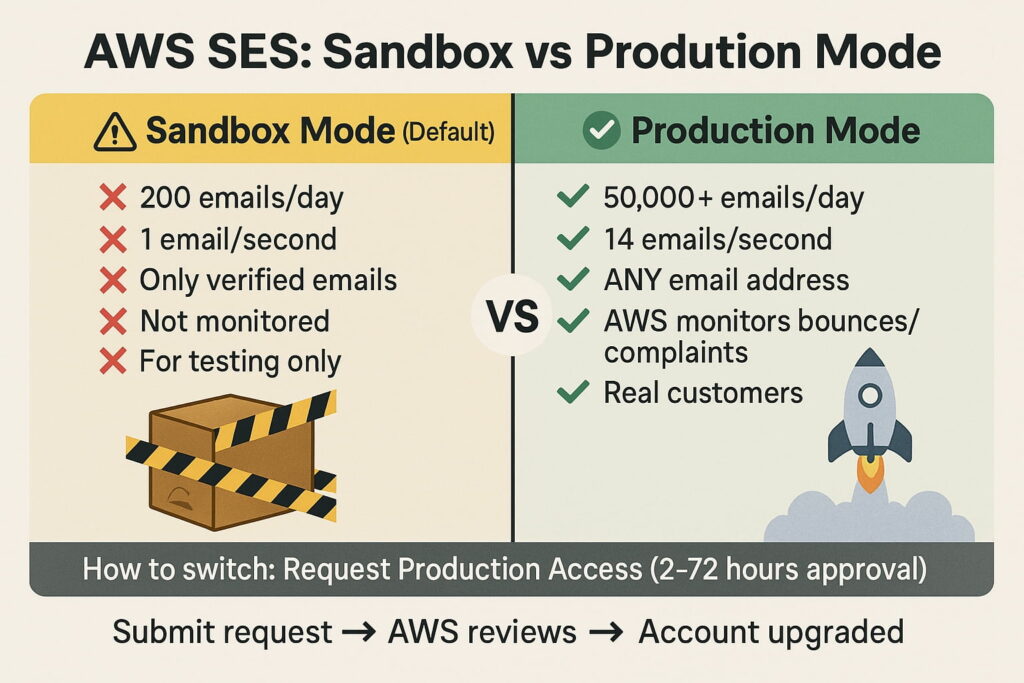
By default, AWS limits you to 200 emails per day (sandbox mode). Request Production Access to unlock full sending capacity.
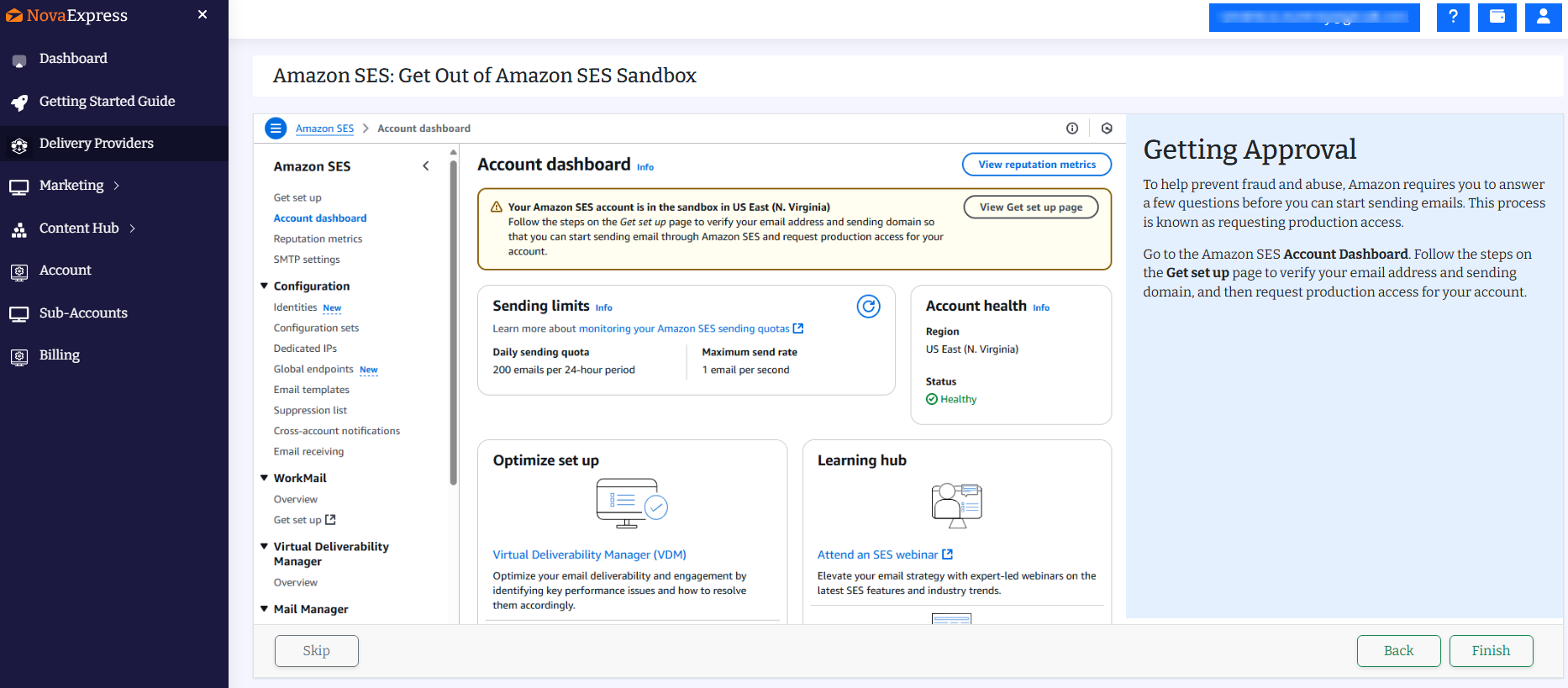
Getting Approval
To help prevent fraud and abuse, Amazon requires you to answer a few questions before you can start sending emails. This process is known as requesting production access.
Go to the Amazon SES Account Dashboard. Follow the steps on the Get set up page to verify your email address and sending domain, and then request production access for your account.
Step 8: Connect Amazon SES to Nova Express
- Paste your Access Key ID and Secret Access Key.
Enter the exact strings you saved in Step 5:
• Access Key ID: AKIAIOSFODNN7EXAMPLE
• Secret Access Key: wJalrXUtnFEMI/K7MDENG/bPxRfiCYEXAMPLEKEY - Select the AWS region where your domain or email address is verified.
CRITICAL: SES identities are region-locked.
Verified in us-east-1? Do not select eu-west-1.
Wrong region = emails disappear silently (SES won’t warn you; it just fails). Quick verification: AWS Console → SES → Verified identities. Use the region selector (top-right dropdown) and confirm your domain shows “Verified” in that exact region. Learn why in AWS Docs. - Click Save & Test.
Your Amazon SES setup is now complete: you can start sending emails at $0.10 per 1,000 messages.

With this single action, you have successfully configured an enterprise-grade email infrastructure and unlocked potential savings of $3,000 or more annually.
Have Questions?
- Want to understand pricing models better? → Read our detailed comparison.
- Want to see your potential savings? → Use the calculator.
Conclusion
Setting up Amazon SES through Nova Express is one of those rare changes that makes your infrastructure simpler and your costs more predictable at the same time. Once the setup is complete, you are working with the same reliable email delivery backbone used by major SaaS companies without inflated pricing or unnecessary features.
Amazon SES brings email sending back to what it should be: transparent, stable, and free from hidden charges tied to contacts or storage. And Nova Express removes the complexity that often makes teams postpone the switch for months.
If your goal is to reduce expenses, improve deliverability, and gain more control over your email operations, start with a small step. Connect Amazon SES and send your first test campaigns. It is a straightforward change that delivers measurable results in the very first month.
Related Articles
Want more tips on email marketing and campaigns? Check out:
- Why AI Engines Trust Reddit More Than Brand Content (And How to Change That)
- How to Start Email Marketing: Guide for Beginners
- Email Campaign Guide: Start in 5 Steps: Launch Your First Campaign Easily.
- Email Warm-Up Guide: 4 Weeks to 90% Inbox Placement
- Mailgun Integration Guide
- NotebookLM for Marketers
- AI Tools for Marketers
- Dan Kennedy’s Email Marketing Principles
- Nano Banana Pro: The Complete Guide for Marketers 2026
- 2026 Holiday Marketing Calendar
This article was originally published in 2025 and updated in 2026 to include the latest strategies and data.
About the author
Serafima Osovitny is a marketing manager at Nova Express. Passionate about turning complex marketing tactics into simple, actionable guides, she shares insights about email marketing and e-commerce. Follow her on Twitter: @OSerafimaA.








It’s great that the article includes both numbers and step-by-step instructions. I especially liked the explanation about SES regions and why that’s important. Very practical.