
Updated October 2026 for Midjourney V8.2, which became the default model on July 24, 2026. Most prompt patterns from V7 still work. The biggest changes: Omni Reference and Character Reference were replaced by the new Edit Model, and Draft Mode is not available in V8.
You’ve got a product launch tomorrow, three social posts due by Friday, and the designer is booked for two weeks. Sound familiar? Midjourney V8 changes this equation entirely. This guide shows you exactly how to create marketing visuals that look like a $5,000 photoshoot, using prompts that actually work.
No artistic background required. Just copy the prompts, swap in your product, and generate.
What’s New in V8 (And What Changed for Your Old Prompts)
V8.2 is now the default model, so you no longer need to add a version parameter. Three changes matter for marketers.
HD output without upscaling. V8.1 added 2K (HD) images directly, which is enough for most web and social formats.
One Edit Model instead of separate reference tools. Omni Reference, Character Reference, and Retexture were replaced by the Edit Model. You attach up to four reference images and describe what you want, and the model keeps the character or object consistent while changing the scene. The same tool also handles edits to parts of an image and extends the frame.
No Draft Mode. V7’s fast, low-cost Draft Mode is not available in V8. For quick exploration, run fewer variations with a shorter prompt, then refine the one that works.
1. Fashion and Accessories
Product shots for apparel and bags that look like a campaign, not a catalog.
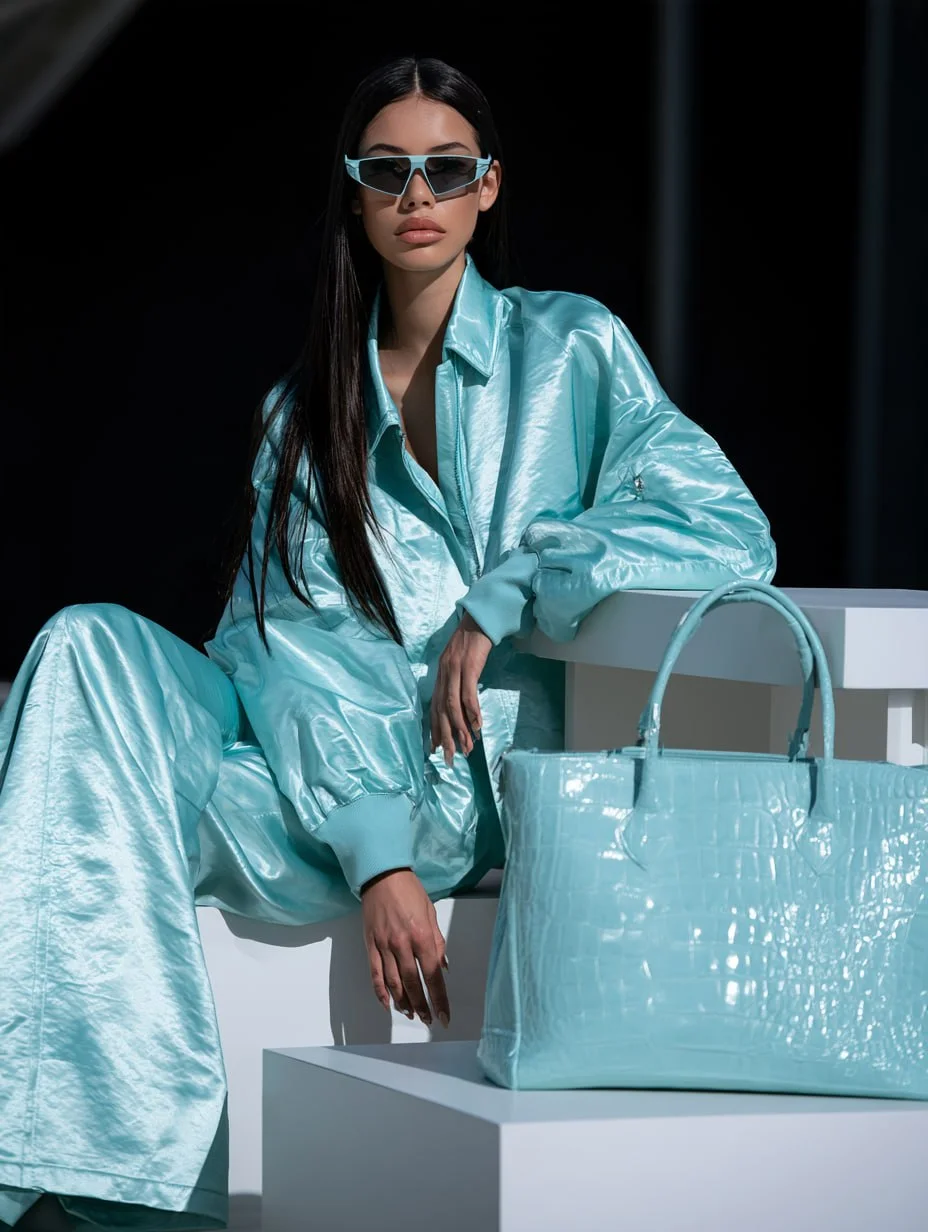
Prompt:
Photorealistic fashion candid shot, young woman with long dark hair, sitting beside a white rectangular table, oversized pale aqua blue satin stand-collar bomber jacket, matching wide-leg satin trousers, wearing futuristic angular sunglasses, large pale aqua blue crocodile-embossed leather tote bag placed on the table, relaxed casual pose, realistic skin texture, shiny satin fabric sheen, sharp details, candid fashion photography, real-life environment, shot on digital camera, 8K photorealism --ar 3:4
Why This Works
- One Color, One Story: Matching the outfit and the bag in a single shade ties the product to the look, so the eye goes straight to the tote.
- Texture Words Do the Selling: “Shiny satin fabric sheen” and “crocodile-embossed leather” tell Midjourney which materials to render in detail, which is what makes a product shot feel premium.
- Candid Beats Posed: “Relaxed casual pose” and “real-life environment” keep the image from looking like a stiff studio catalog.
2. Beauty Editorial
Skincare and beauty visuals with natural light and real skin texture.
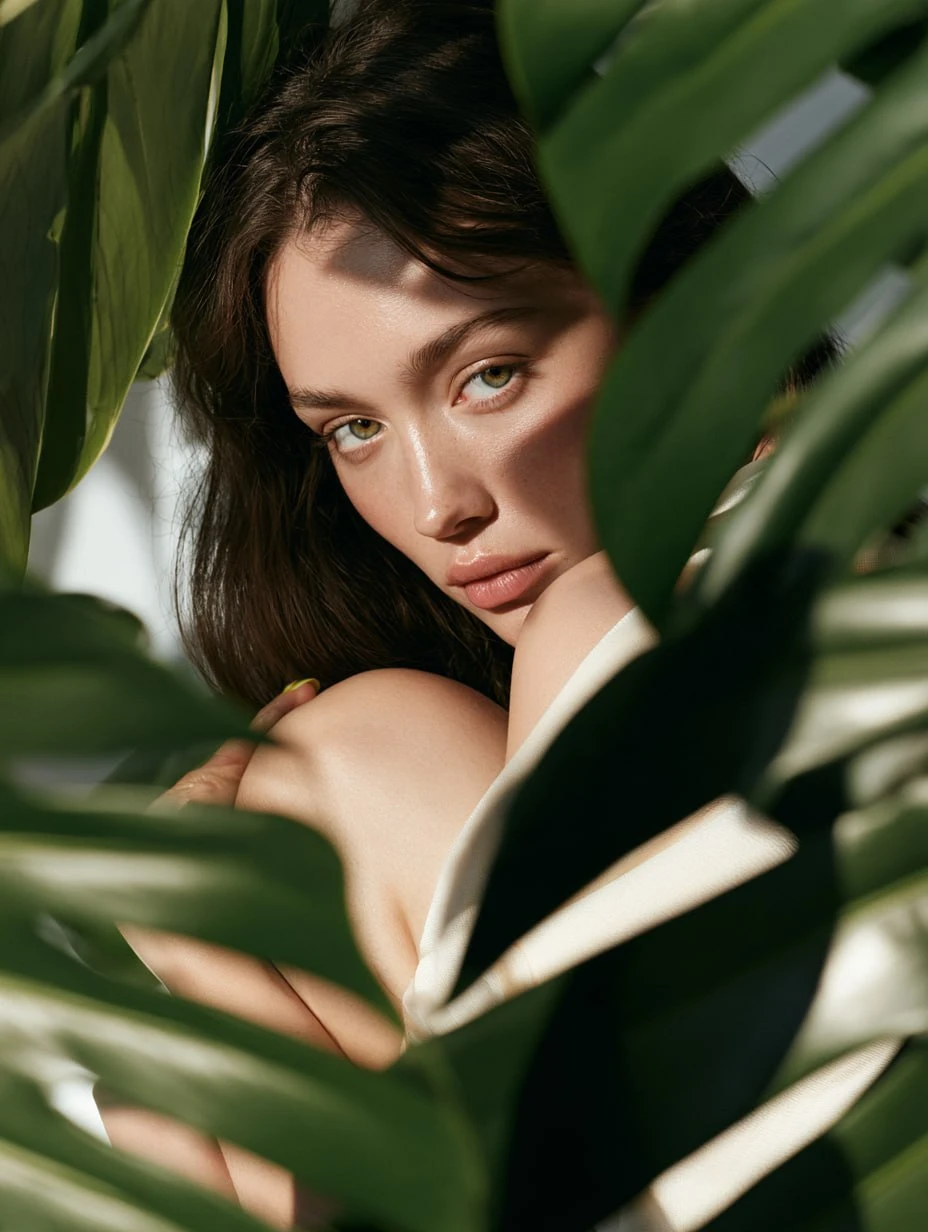
Prompt:
The model hugs her knees, relaxed pose, side view. The girl looks at the camera, long hair. Three-quarters of the frame is taken up by monstera leaves, and the model is positioned in the lower left corner of the frame according to the rules of composition. Ultra-photorealistic editorial shoot, detailed skin texture, natural skin pores, subtle makeup, professional studio lighting with soft diffusers, cinematic shadows, high-fashion magazine style, shot on Phase One IQ4 (150MP), ultra-sharp focus, realistic depth of field --ar 3:4
Why This Works
- Composition Written Into the Prompt: Placing the model “in the lower left corner” with leaves filling three-quarters of the frame gives you a built-in empty area for a headline or logo.
- Real Skin Sells Skincare: “Natural skin pores” and “subtle makeup” avoid the plastic look that makes beauty ads feel fake.
- Nature as a Brand Cue: Monstera leaves signal clean, plant-based, and fresh without a single word of copy.
3. Visual Pun Ads
A single image that tells a joke stops the scroll.
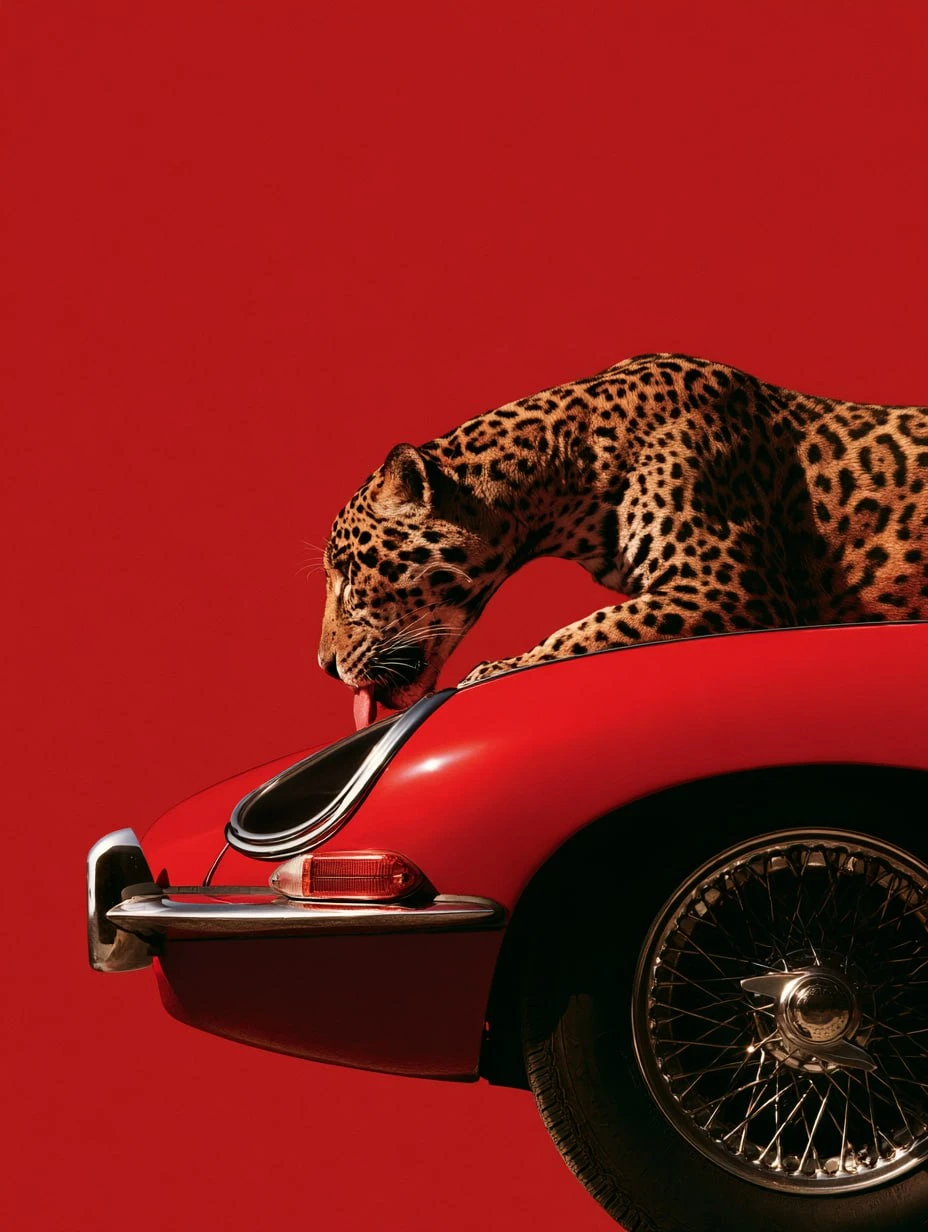
Prompt:
A jaguar leaning over the long bonnet of a red 1960s British sports coupe, licking the front of the car, chrome bumper, round wire wheels, side profile from the front bumper to behind the front wheel, solid red background, bold high-fashion advertising photography, clean studio lighting --ar 3:4 --style raw
Why This Works
- The Pun Is the Hook: Pairing a product with something that shares its name or trait creates a double take that makes people stop and look twice.
- One Color, Maximum Contrast: A solid red background against the animal’s spotted coat keeps the image simple enough to read in a second.
- Make It Your Own: Swap the car for your product and the animal for anything that shares a name, a shape, or a trait with your brand.
4. Illustrated Campaigns
When a photo feels too literal, an illustration style gives the brand its own look.
Retro Travel Poster
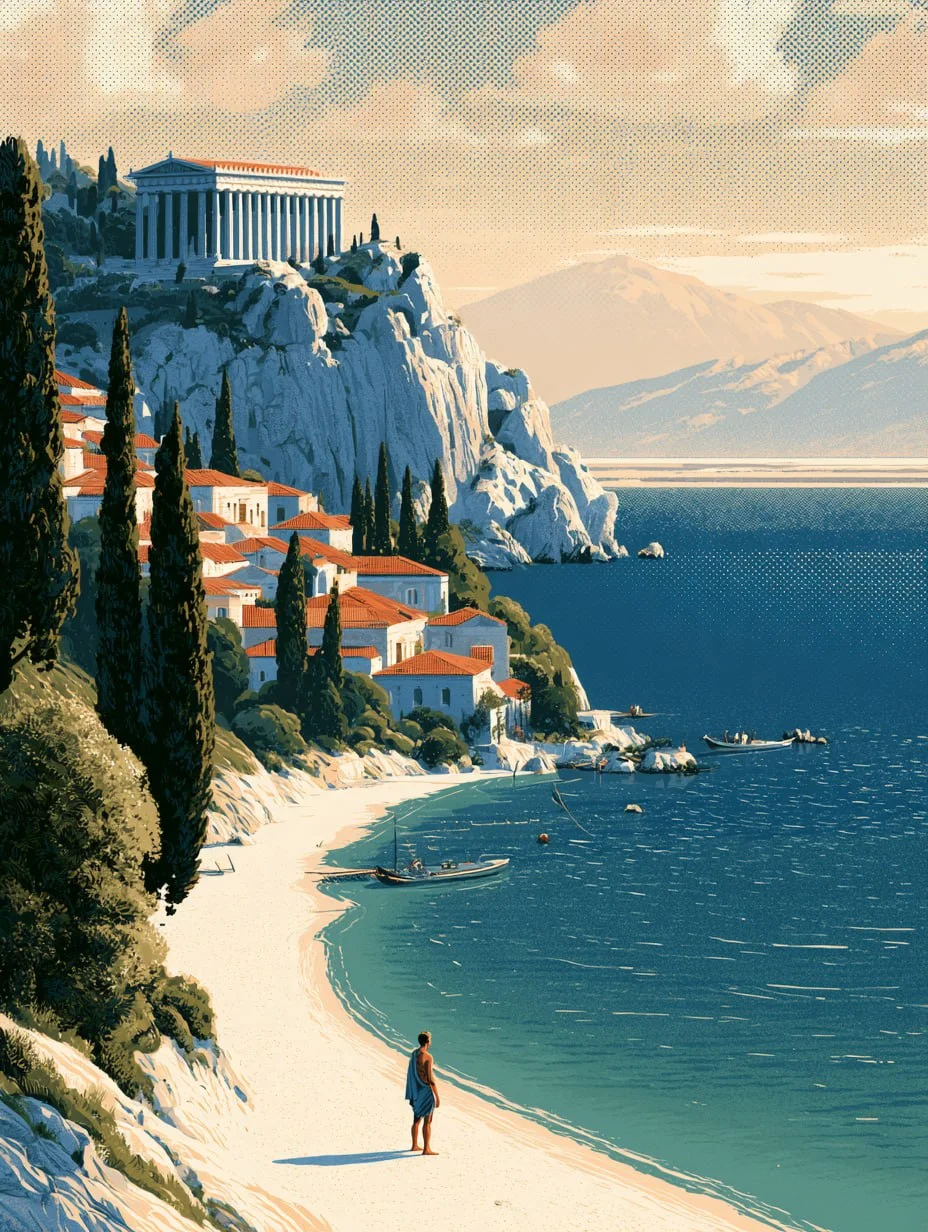
Prompt:
A lone traveler standing on a sandy beach on the shore of a Greek island, looking up toward an ancient columned temple on a rocky cliff in the distance, terracotta rooftops of the town scattered along the coast, tall cypress trees, small fishing boats near the shore, deep turquoise-blue sea, distant hazy mountains, warm daylight sky with soft clouds, flat cel-shaded illustration style, bold black outlines, retro travel poster aesthetic, halftone grain texture overlay, limited saturated color palette of deep blue, white, terracotta red and green, ligne claire comic style --ar 3:4
Watercolor Art Print
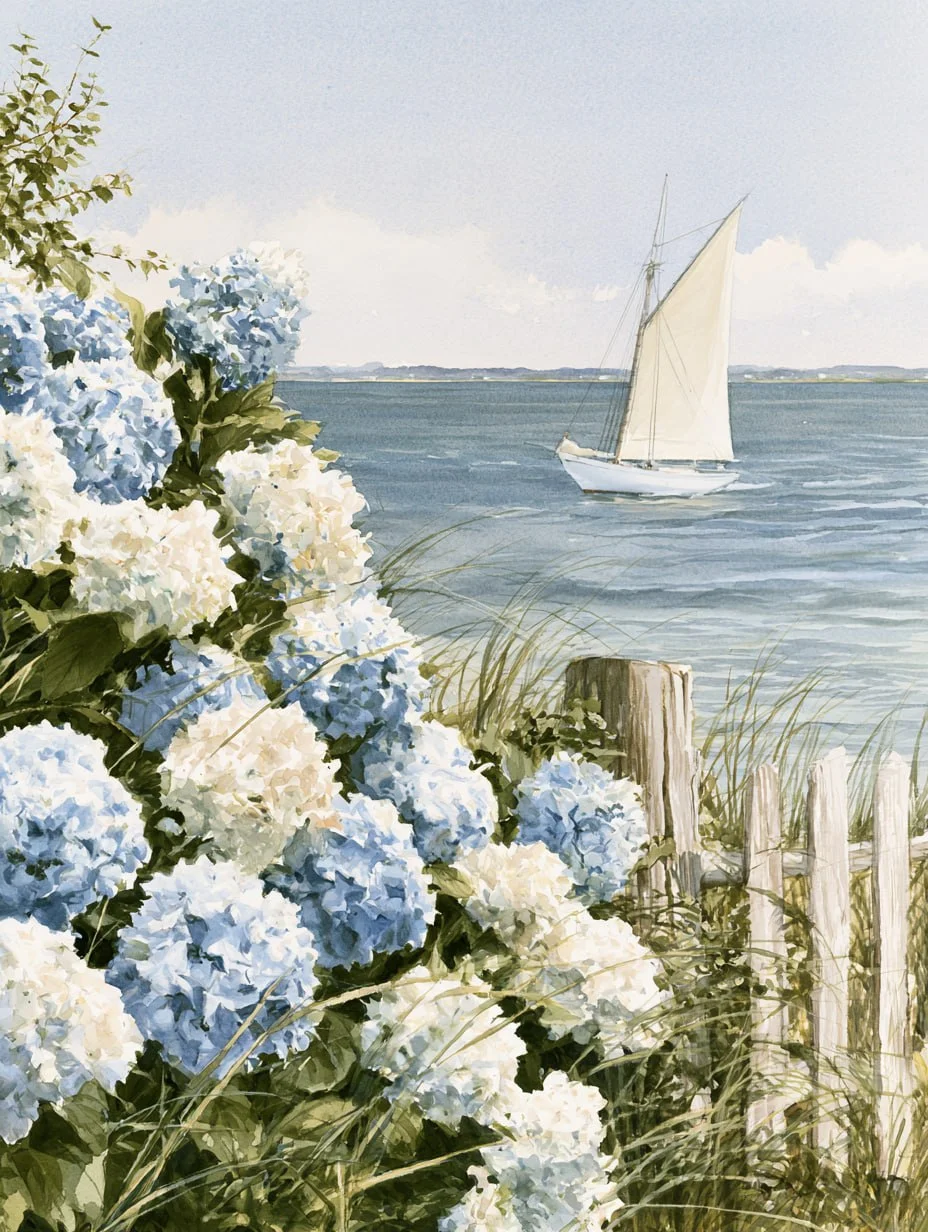
Prompt:
Lush dusty blue and creamy white hydrangeas blooming beside a weathered coastal fence overlooking a peaceful harbor, vintage white sailboat with soft cream sail drifting across muted blue water in the middle distance, subtle dune grasses and greenery woven among flowers, distant hazy shoreline, luminous soft summer sky. Traditional hand painted watercolor and gouache, loose expressive brushwork, translucent washes, visible brushmarks, cold pressed cotton paper texture. Muted palette: dusty hydrangea blue, warm ivory, soft sage, sandy beige, driftwood gray. Airy, elegant, timeless fine art --ar 3:4 --no people, text, photorealism, 3D render
Why These Work
- Name the Medium, Not Just the Subject: “Retro travel poster,” “halftone grain,” and “watercolor and gouache” decide the whole look more than the scene itself does.
- A Fixed Palette Keeps It On-Brand: Listing exact colors in the prompt keeps every image in a series consistent.
- Exclusions Keep It Clean: The
--noparameter removes people, text, and photo-like rendering, so the result stays an illustration.
5. Style Reference Codes for Holiday Campaigns
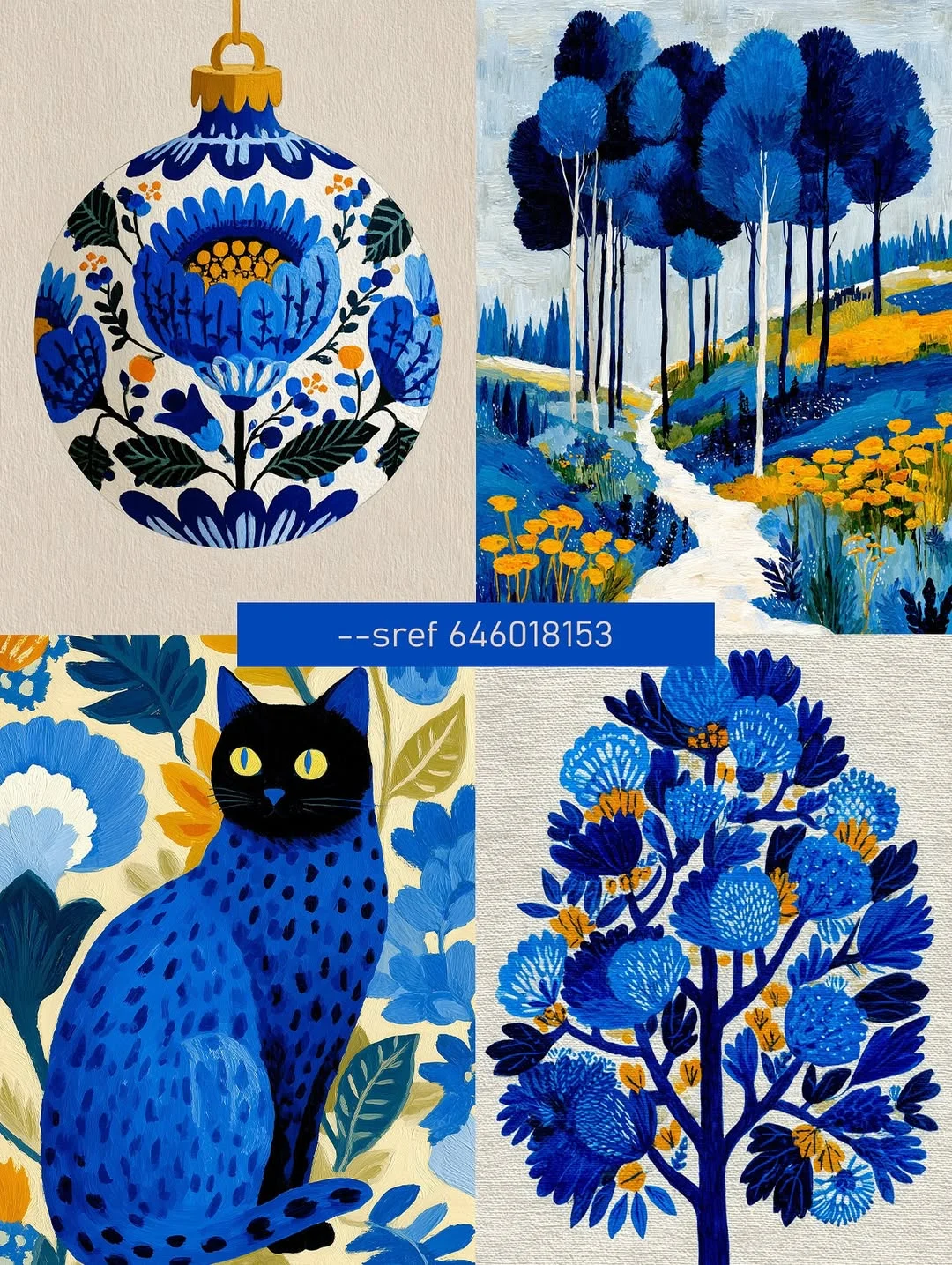
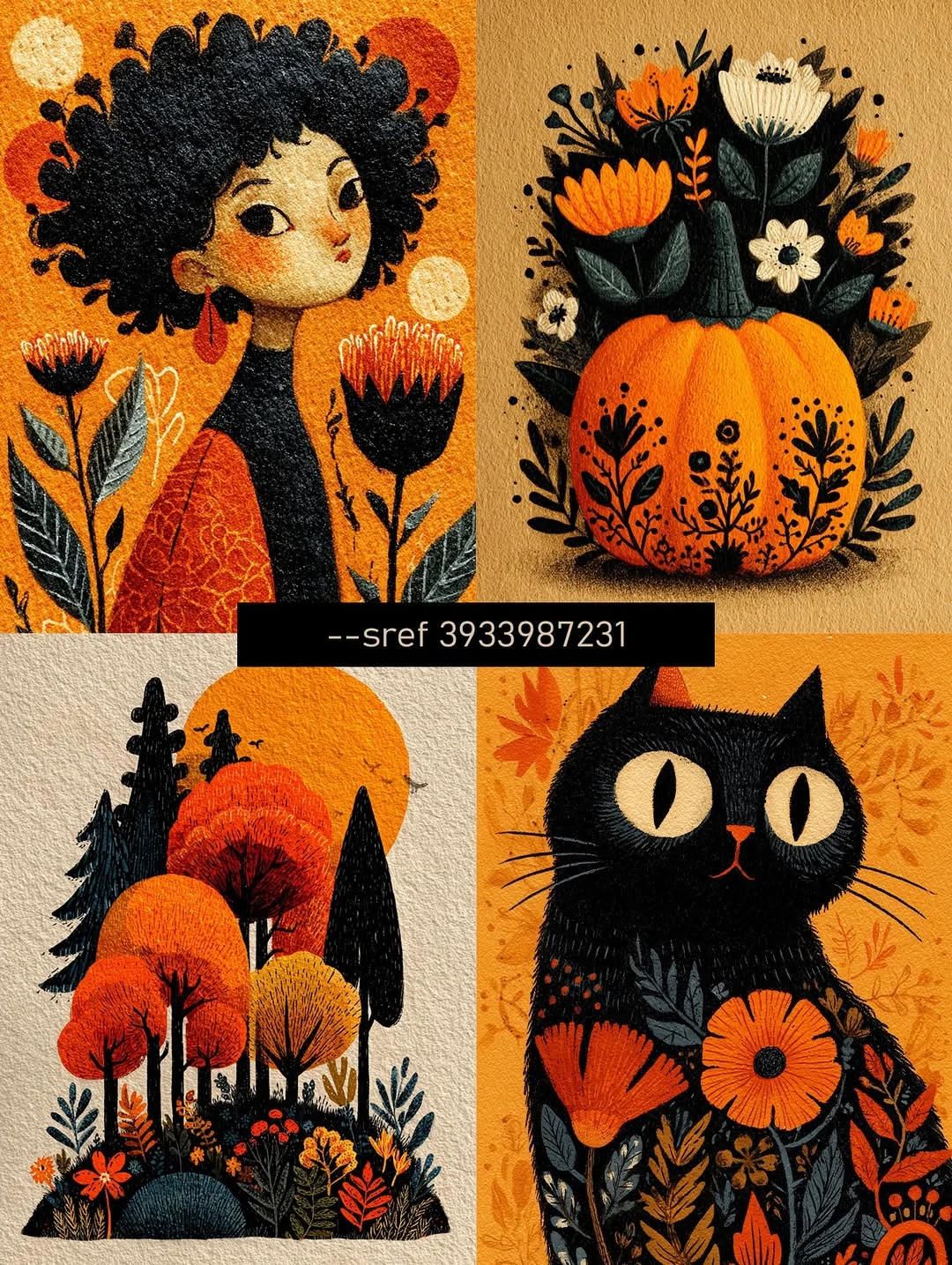
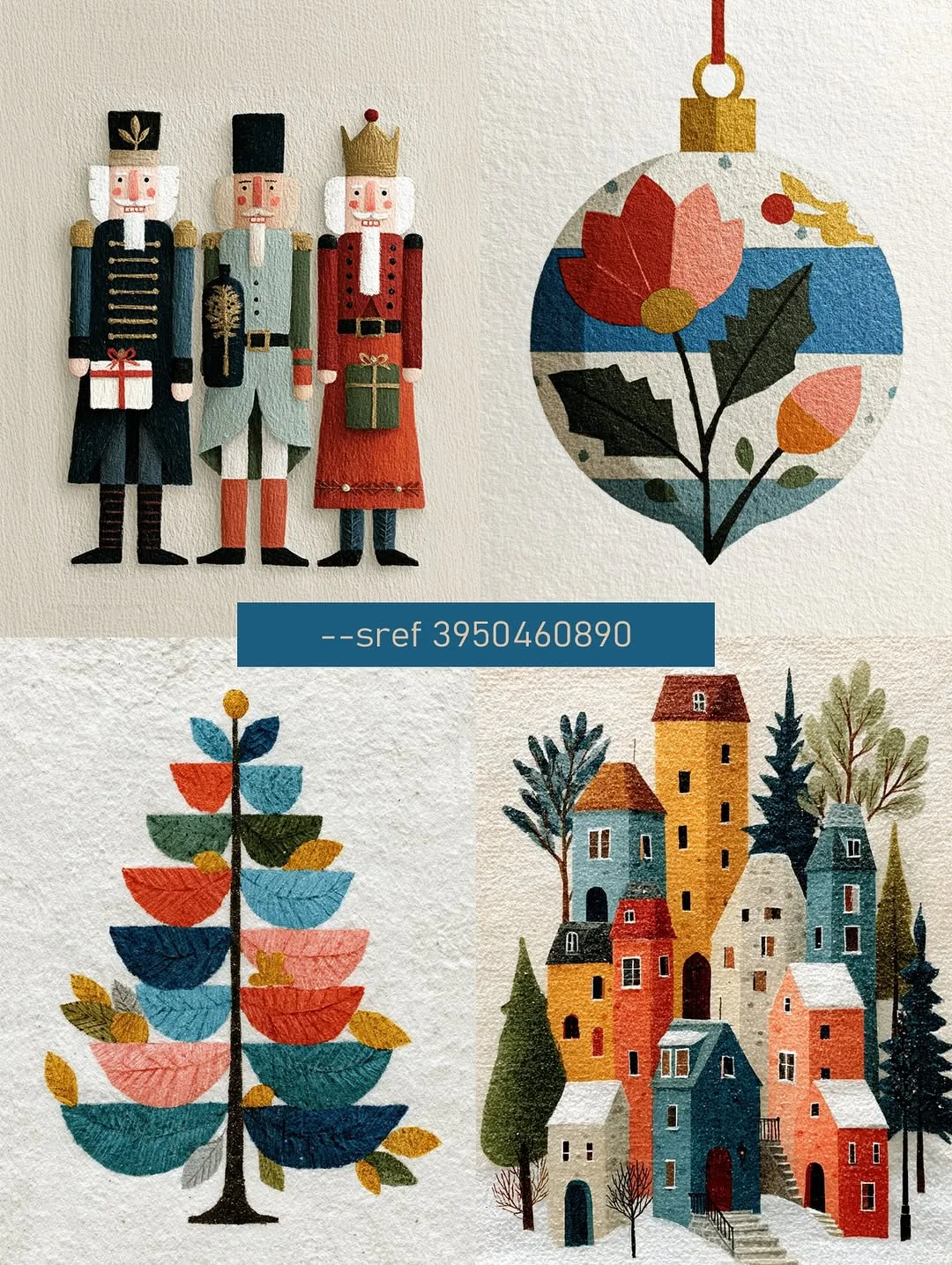
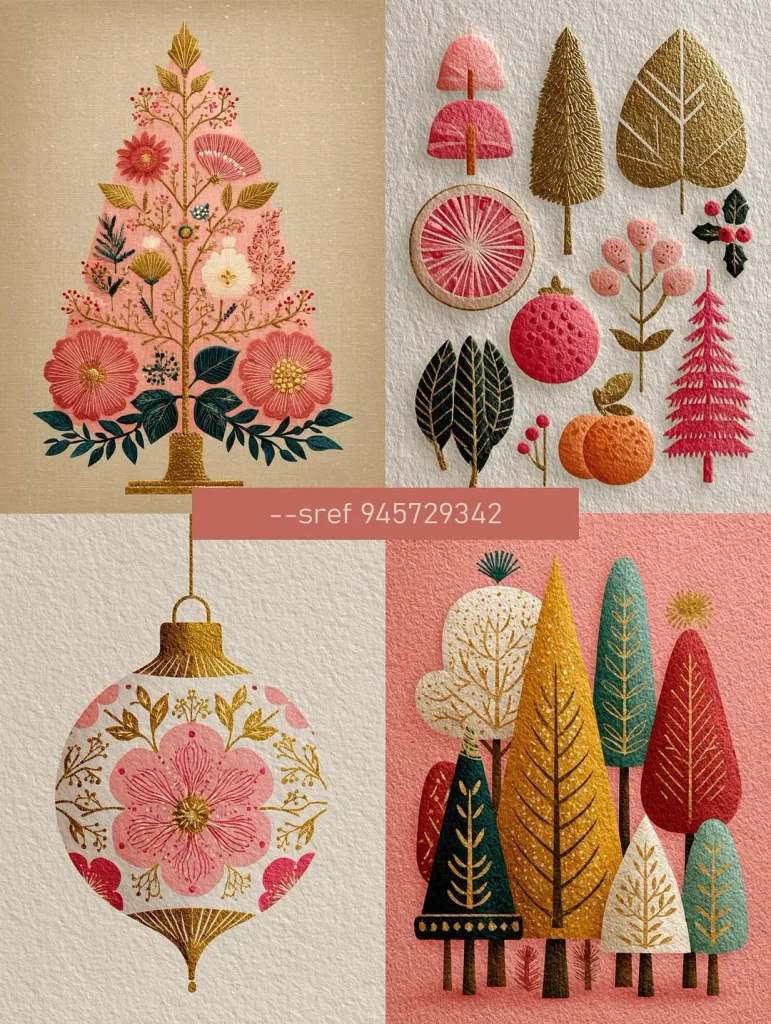
A style code applies a ready-made visual style to any prompt. Add --sref and the code to the end of your prompt, for example: holiday gift box on a table --sref 3950460890. Results depend on your prompt, so expect variations of the style, not copies of these images.
- Blue Folk Art:
--sref 646018153. Hand-painted blue and gold folk patterns for winter campaigns and ceramics-style decor. - Autumn Folk Illustration:
--sref 3933987231. Orange and black textured illustrations for fall and Halloween promotions. - Scandinavian Christmas:
--sref 3950460890. Paper-craft nutcrackers, ornaments, and snowy towns for holiday cards and social posts. - Pink and Gold Holiday:
--sref 945729342.Soft pink with gold foil details for beauty, fashion, and gift guides.
Common Midjourney Prompt Mistakes
Mistake 1: Being Too Generic
- ❌ Bad: product photography of headphones
- ✅ Good: commercial advertising photography of black wireless headphones, minimal studio background, soft dramatic lighting, shot on Canon EOS R5, 85mm lens
--ar 1:1 - The Impact: Generic prompts yield generic results. Midjourney needs specific creative direction to deliver professional-grade output.
Mistake 2: Using the Wrong Aspect Ratio
- ❌ Bad: Instagram post of coffee shop
--ar 16:9 - ✅ Good: Instagram post of a coffee shop
--ar 4:5 - The Impact: Instagram feed posts perform best at 4:5 (vertical) to occupy the most screen real estate. Stories and Reels require 9:16. Always match your format to the destination platform.
Mistake 3: Omitting Camera Keywords
- ❌ Bad: realistic photo of a woman in a dress
- ✅ Good: realistic photo of a woman in a dress, shot on Canon EOS R5, 85mm lens, f/1.8, professional studio lighting
--style raw - The Impact: Camera specs define the “look” of realism. Without them, Midjourney defaults to a generic digital aesthetic. Technical keywords give you that high-end optical feel.
Mistake 4: Overloading Conflicting Styles
- ❌ Bad: minimalist, maximalist, vintage, modern, abstract, realistic photo
- ✅ Good: minimalist product photography, clean composition, neutral tones, modern aesthetic
- The Impact: Contradictory keywords confuse the model. For the best results, pick a single creative direction and commit to it.
Best-in-Class Keywords by Category
| Category | Recommended Keywords |
| Advertising | commercial advertising photography, product campaign image, brand advertising shot, editorial ad, premium brand aesthetic |
| Realism | shot on a Canon EOS R5, 50mm/85mm lens, professional studio lighting, three-point lighting setup, f/1.8 aperture |
| Social Media | Instagram aesthetic, lifestyle photography, candid moment, natural lighting, shareable visual, viral content style |
| E-commerce | white seamless background, product catalog style, clean composition, soft studio lighting, commercial product shot |
| 3D & Characters | C4D-style render, 3D character design, blind box toy aesthetic, collectible figure, isolated on a white background |
Technical Parameters Quick Reference
Aspect Ratios (- -ar)
- 16:9: Website hero images, presentations, and YouTube thumbnails.
- 9:16: Stories, Reels, TikTok, and mobile-first ads.
- 4:5: Instagram Feed (maximum vertical real estate).
- 2:3: Magazine covers and high-fashion editorial layouts.
Style & Model Controls
- V8.2 is the default model, so you don’t need a version parameter. Add –hd for 2K output.
- Edit Model (replaces
--crefand Omni Reference): attach up to four reference images in the Imagine bar to keep a character or product consistent. On Discord, add--editand paste the image URLs. --style raw: Reduces internal “beautification.” Use this for an organic, less-processed look.--s [value]: Stylize. Higher values (250+) add artistic flair; lower values (50-100) keep it literal.--c [value]: Chaos. Increases variation between the four initial images.
Workflow: From Brief to Final in 4 Steps
- Step 1: Explore First: Start with 8-12 rough concepts using short prompts. Keep the first round simple so you can see which directions work before you spend time on details.
- Step 2: Pick the Winners: Select 2-3 directions that best align with your creative brief. Avoid falling in love with a single option too early in the process.
- Step 3: Render at Full Quality: Expand your winning prompts with full detail and add
--hd 2K output.This is where you invest your GPU time for high-fidelity results. - Step 4: Generate Iterations: Use the “Vary (Subtle)” feature to create A/B test versions. Aim for 3-4 variations of each winner to give yourself (or your client) options.
- The Bottom Line: This workflow allows you to produce a full campaign’s worth of visual options in just 10-15 minutes.
Managing Expectations: What Midjourney Can’t Do (Yet)
- Precise Typography: Midjourney still struggles with readable, complex text. For text-heavy designs, generate your background in Midjourney and use a tool like Ideogram or Canva to overlay the copy.
- Exact Product Replication: Midjourney is an interpreter, not a 3D scanner. It is perfect for lifestyle concepts, but don’t expect it to replicate every screw and logo of your specific physical product perfectly.
- Total Character Consistency: The Edit Model, which replaced Character Reference, keeps a character consistent across up to four reference images, but features can still get mixed up when several characters appear in one image. Midjourney suggests combining your characters into a single reference image.
- Legal and IP Clearance: AI-generated images exist in a complex legal gray area. For high-stakes global campaigns, always consult with your legal team regarding intellectual property status.
Universal Midjourney Prompt Template
If you don’t want to build prompts from scratch, use this simple structure.
Commercial advertising photography of [PRODUCT], minimal studio background, professional lighting, shot on Canon EOS R5, 85mm lens, clean composition --ar 1:1 --style raw
Replace [PRODUCT] with your item and adjust the aspect ratio depending on the platform.
Your Next Move
Start by picking one prompt from this guide. Generate four images. Choose the best one. That is your new workflow. The marketers winning with AI aren’t necessarily the ones with the most expensive subscriptions. They are the ones who found a tool that solves a specific creative bottleneck and mastered it. For high-end visual content, Midjourney is that tool.
Build Your Visual Stack, Save Your Time
AI tools don’t replace marketers; they replace the grunt work that stalls your creativity. A high-end product photoshoot that once required a $5,000 budget and two weeks of planning can now be conceptualized and drafted in Midjourney in under 15 minutes.
The pattern for the modern marketer is clear: use AI to handle the heavy lifting of execution so you can focus on high-level strategy and the human storytelling that actually grows your business.
FAQ
What is the best Midjourney prompt for product photography?
Use “commercial advertising photography” with camera specs like Canon EOS R5 and studio lighting.
Does Midjourney V8 create realistic product photos?
Yes, but it may not perfectly replicate logos or exact product details.
What aspect ratio should I use for Instagram?
4:5 for feed posts and 9:16 for stories or reels.
Nova Express Resources
- AI Tools for Marketers in 2026
- GPT Image 2 for Marketers: How to Finally Get Readable Text in AI Images
- NotebookLM for Marketers
- Nano Banana Pro: The Complete Guide for Marketers 2026
- NotebookLM Infographic: The Complete Guide to Turning Your Data Into Visual Stories
- Stop Selling to People Who Don’t Know They Have a Problem
- Why AI Cites Some Brands and Ignores Others: The Citation Stack Explained
- Best AI Video Generators for Marketers in 2026
- What Are AI Tokens? A Marketer’s Guide to Context, Cost, and Limits
- AI Image Color Palette: How to Borrow One From Nature
- Nano Banana Prompts
About the author
Serafima Osovitny is a Marketing Manager at Nova Express, where she focuses on digital marketing, search visibility, content strategy, and marketing workflows. She writes practical guides that help marketing teams research their audiences, develop strategies, and put their plans into action.
Explore her work at serafima.digital and follow her on X: @OSerafimaA.






Leave a Comment